
 Purchase Now
 Live Preview







 Purchase Now

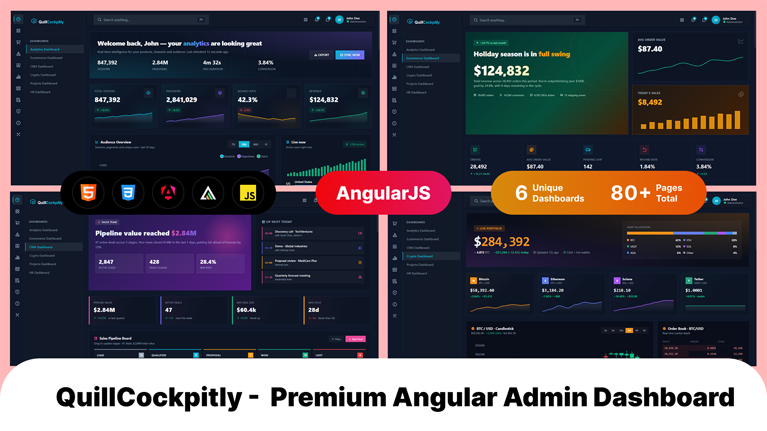
QuillCockpitly is a modern, premium, and fully responsive admin dashboard template built with the latest Angular 17, leveraging Standalone Components, Signals, and the new control-flow syntax (@if / @for). Designed for SaaS platforms, enterprise applications, fintech dashboards, ecommerce back-offices, CRM systems, project management tools, HR portals, crypto trackers, and analytics consoles, QuillCockpitly delivers a beautifully crafted dark-themed UI with gradient accents, glassmorphic surfaces, and pixel-perfect typography. With 80+ unique hand-built pages, real interactive ApexCharts integration, drag-and-drop interactions, multi-step wizards, sortable and editable tables, and production-ready deployment configuration, this template gives you everything you need to ship a world-class admin panel in record time.
Why Choose QuillCockpitly?
Whether you are launching a startup product, redesigning an internal tool, or building a client deliverable, QuillCockpitly is engineered to save weeks of design and development effort. Every page is purpose-built — not a recycled template. The Email page works like an email app. The Chat page feels like a chat app. The Kanban page actually drags. The Forms page validates. Every dashboard contains real interactive charts (not static SVGs). Auth, Error, and Misc pages render standalone without sidebar/topbar/footer for a clean, professional first impression.
Key Features
- Angular 17 with Standalone Components (no NgModules required)
- Angular Signals & Computed values for reactive state management
- New Control Flow syntax (
@if,@for,@switch) throughout - Lazy-loaded routing — users only download the chunk for the page they visit
- SCSS-based styling with CSS variables for instant theme customization
- Fully responsive across desktop, tablet, and mobile (1199 / 991 / 767 / 575 breakpoints)
- Dark premium UI with gradient accents, glassmorphism, and subtle animations
- ApexCharts integrated via a custom
[chartHost]directive for real interactive charts - Remix Icon 4.5 font included via CDN with thousands of icons
- Inter and JetBrains Mono typefaces for premium typography
- Off-canvas mobile drawer with smooth animations
- Active route synchronization — sidebar highlights the current page even after refresh
- Sticky footer at the bottom of viewport when content is short
- SPA routing fallback —
.htaccessincluded for Apache shared hosting - Hashed asset filenames for aggressive long-term caching
- SEO-ready meta tags and semantic HTML
- Production-optimized bundle — ~510 KB gzipped, ~1.9 MB unpacked
- Cross-browser tested on Chrome, Firefox, Safari, Edge (last 2 versions)
- Well-documented with a comprehensive HTML guide included
- Free lifetime updates for all customers
Template Includes
6 Premium Dashboards
- Analytics Dashboard — visitor analytics, traffic sources, conversion funnels, real-time stats
- Ecommerce Dashboard — revenue, orders, top products, customer acquisition, sales trends
- CRM Dashboard — sales pipeline, deals, contacts, activity feed, leaderboard
- Crypto Dashboard — portfolio value, market cap, watchlist, candlestick charts, transactions
- Projects Dashboard — project status, progress, team workload, milestones, calendar
- HRM Dashboard — employees, attendance, payroll, leave requests, performance reviews
12 Application Pages
- Email Inbox (mail-app style: folder list, message list, reading pane)
- Chat App (conversation list, active chat, attachments, emoji)
- Calendar (month/week/day views, event creation)
- Kanban Board (draggable cards across columns)
- Tasks (priorities, due dates, filters)
- Contacts (grid + detail panel, tags)
- File Manager (folder tree, file grid, upload, breadcrumb)
- Invoice List (status filters, bulk actions)
- Invoice Detail (printable layout with totals)
- Notes (color-coded, pin, search)
- Todo (lists, completion, drag-reorder)
- Scrumboard (sprint view, story points)
6 Ecommerce Pages
- Products Grid with filters and sorting
- Product Detail with image gallery and variants
- Shopping Cart with quantity controls and totals
- Multi-step Checkout with payment forms
- Orders Management with status tracking
- Customers List with profiles and order history
20 UI Element Pages
- Alerts, Badges, Buttons, Cards, Carousels (working auto-play)
- Modals (multiple sizes), Tabs, Tooltips, Accordion, Progress bars
- Breadcrumb, Pagination, Spinners, Toast notifications
- Avatars, Dropdowns (with z-index handling), List Group, Media Object, Popover, Typography
8 Form Pages
- Basic Forms with all input types
- Advanced Forms (tag input, slider, toggle, file picker)
- Rich Text Editor with formatting toolbar (execCommand based)
- Validation with Luhn algorithm for credit cards, email, password strength
- Multi-step Wizard with progress indicator
- File Upload with drag-and-drop and progress simulation
- Repeater Form with add/remove rows and live calculation
- Cascading Select (country → state → city)
5 Chart Library Demos
- ApexCharts (line, area, bar, donut, radial, candlestick, heatmap)
- Chart.js examples
- ECharts examples
- Sparkline charts
- Knob / radial progress charts
4 Table Page Variants
- Basic Tables — 6 distinct table styles in one page
- Data Tables — sortable headers, search, status filters, pagination, bulk select, density toggle, column visibility, CSV export
- Responsive Tables — horizontal scroll, stacked card view on mobile, priority columns, table/card toggle, expandable rows
- Editable Tables — inline cell editing, add row, undo delete, invoice builder with live totals
12 Content Pages
- User Profile with cover, stats, tabs (activity, projects, reviews), achievements
- Account Settings with sticky sidebar nav (general, security, billing, notifications, integrations, API keys, danger zone)
- Pricing with monthly/yearly toggle, 4 plans, feature comparison table, FAQ
- FAQ with searchable, categorized accordion
- Terms of Service with sticky table-of-contents
- Activity Timeline with filters and grouped events
- Photo Gallery with masonry layout, categories, and working lightbox
- Blog List with featured posts, categories, pagination, newsletter
- Blog Detail with code blocks, comments, reactions, related posts
- Contact Page with channels, validated form, world map, office locations
- About Us with hero, values, timeline, team grid, investors, careers CTA
- Search Results with filters, type tabs, highlighted matches
6 Authentication Pages (Standalone Layout)
- Sign In with social login options
- Sign Up with password strength meter
- Forgot Password
- Reset Password with live requirement checks
- Lock Screen with live clock
- Two-Factor Authentication with auto-advancing OTP inputs and countdown
6 Error Pages (Standalone Layout)
- 400 Bad Request
- 401 Unauthorized
- 403 Forbidden
- 404 Not Found with search box and quick links
- 500 Server Error with stack trace and incident ID
- 503 Service Unavailable with live status board
3 Misc Pages (Standalone Layout)
- Maintenance with progress bar and update timeline
- Coming Soon with live countdown and email subscription
- Landing Page with hero, features, stats, CTA bands
Technical Specifications
- Framework: Angular 17.x
- Language: TypeScript 5.x
- Styling: SCSS with CSS variables
- Charts: ApexCharts (loaded via CDN)
- Icons: Remix Icon 4.5 (loaded via CDN)
- Fonts: Inter, JetBrains Mono (Google Fonts)
- Build Tool: Angular CLI (Webpack 5)
- Node Version: 18.13+ (20 LTS recommended)
- Bundle Size: ~510 KB gzipped / ~1.9 MB uncompressed
- Architecture: Standalone components with lazy-loaded routes
What’s Included in the Package
- Complete Angular 17 source code (TypeScript)
- SCSS source files with CSS variables
- SVG favicon and brand assets
- Production build (
dist/) ready to upload - Apache
.htaccessfor SPA routing - Comprehensive HTML documentation
- This description file
package.jsonwith all dependencies pinnedangular.jsonpre-configured for production builds withbaseHref
Browser Support
- Google Chrome (latest 2 versions)
- Mozilla Firefox (latest 2 versions)
- Microsoft Edge (latest 2 versions)
- Apple Safari (latest 2 versions)
- Mobile browsers (iOS Safari, Chrome Mobile)
Use Cases
QuillCockpitly is suitable for a wide range of admin dashboard projects, including but not limited to: SaaS application back-office, ecommerce store management, customer relationship management (CRM) software, project management tools, human resources management (HRM) systems, cryptocurrency portfolio trackers, fintech dashboards, analytics platforms, content management systems (CMS), inventory management systems, hospital management software, school management portals, real-estate management dashboards, and developer-tools admin panels.







 Live Preview