
 Purchase Now
 Live Preview







 Purchase Now

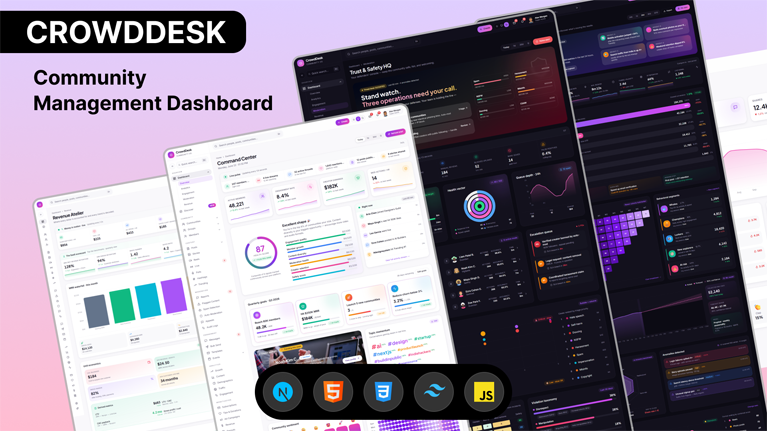
CrowdDesk is a meticulously crafted, production-ready admin dashboard template purpose-built for social media networks, community platforms, creator marketplaces, fan platforms, and member-driven SaaS products. Engineered on the very latest stable Next.js 15.1 with the new App Router, React 19, TypeScript 5.7 in strict mode, and Tailwind CSS 3.4, CrowdDesk delivers a premium development experience and a flawless end-user interface that you can drop into your next project today.
Built by a team that has shipped admin tooling for real social platforms, CrowdDesk is not just another template — it is a complete community-operations control system. The template ships with 80+ unique pages, 5 distinctively-designed dashboards, a full theme engine, a complete component library, deep Right-to-Left (RTL) support, dark/light/system mode, and over 40 chart variants. Every interaction has been hand-wired so that buttons fire toasts, forms validate, tabs filter content, search inputs work, modals confirm, and the included chat application actually sends messages.
Why developers choose CrowdDesk
Most admin templates feel like a graveyard of static screens with placeholder content. CrowdDesk is the opposite. Every page is alive. Every dashboard has unique content. Every chart is themed. Every component is responsive down to 360 pixels. Every settings toggle does something real and persists to localStorage. Every text label uses realistic copy instead of “Lorem ipsum.” Charts are powered by Recharts with a custom palette, state management is handled by Zustand with persist middleware, and forms are validated client-side with proper error feedback.
CrowdDesk is hydration-safe out of the box. The mock data uses a seeded Mulberry32 pseudo-random number generator so that the server-rendered HTML matches client expectations byte-for-byte. Dates are formatted with explicit en-US locale and UTC reference timestamps to prevent locale mismatches. The Zustand persist store uses skipHydration with a manual rehydrate-after-mount pattern to eliminate flash-of-default content. The layout shell uses a mounted-flag gate so that user-saved theme, layout, sidebar, and direction preferences only apply after the first paint, never during it.
Five unique dashboards, never repeated
CrowdDesk ships with five distinct, hand-designed dashboards. Each dashboard tells its own story and contains no repeated sections from any other dashboard. The five dashboards include:
- Command Center (Overview): Personalized control room with a live pulse ticker, premium stat cards with sparklines, a circular community health gauge scored out of 100, a right-now activity panel, quarterly OKR tracker, creator spotlight, topic momentum word cloud, sentiment timeline, best posting times heatmap, AI risk radar, global activity map, A/B test winners, achievement unlocks, and a recommended resource library.
- Insights Studio (Analytics): A premium analytics laboratory with an AI insights hero, KPI command bar, multi-stage conversion funnel, cohort retention matrix, behavioral segment cards, a 30-day machine-learning forecast with 95-percent confidence intervals, an engagement DNA radar, anomaly detection, content quality versus volume quadrant scatter, conversion path chains, real-time visitor counter, time-to-value milestones, industry benchmark comparisons, and an AI-discovered insights feed.
- Trust & Safety HQ (Moderation): A defender’s console with a threat-level brief, live threat detection ticker, SLA performance gauge, queue depth chart, moderator effectiveness leaderboard, escalation queue with SLA countdown timers, severity-by-response-time matrix, community safety heatmap, violation taxonomy, trust standing atlas with watchlist and trust signals, AI versus human accuracy comparison, justice scorecard, recent precedent decisions, policy update log, and a unique moderator wellness panel.
- Revenue Atelier (Finance): Premium financial command center with a live money ticker, full SaaS scorecard (NRR, GRR, Magic Number, Quick Ratio, Rule of 40, CAC Payback), MRR waterfall, unit economics calculator, revenue mix donut, plan migration flow, cohort revenue retention heatmap with expansion compounding, top contributor leaderboard, geographic revenue map, bull/base/bear forecast scenarios, pricing experiments, promotional code performance, dunning recovery funnel, refund intelligence panel, creator payout leaderboard, and tax compliance dashboard.
- Engagement: Activity-focused dashboard tracking likes, comments, shares, hot posts ranked by engagement velocity, top creator leaderboard, engagement mix radial chart, weekly engagement bar chart, and an emoji reaction distribution.
Complete page inventory
CrowdDesk includes 80+ pre-built pages organized into logical sections, ready for you to wire up to your backend APIs. The included pages cover:
- User management: users list with filters, user detail with cover, verified users, banned users, influencers leaderboard, roles & permissions matrix, user activity feed, invite flow.
- Community management: communities grid & list, community detail, featured communities, categories, community members, community rules, community settings, new community creation flow.
- Content: posts feed, post detail with comments, post composer with AI assist, drafts, Instagram-style stories with viewer, vertical reels player, live streams with chat sidebar, polls, hashtag explorer, trending board, discover page.
- Moderation: reports queue, kanban moderation queue, flagged content cards, spam detection, auto-moderation rules manager, appeals review, full audit logs.
- Messaging: Premium three-column chat application with reactions, replies, voice messages, image messages, read receipts, typing indicators, online presence; bulk message composer; reusable templates.
- Events: events grid, full event detail with attendees, calendar view, create event flow.
- Groups: all groups, my groups, group detail, group activity feed, create group flow.
- Analytics: growth analytics with cohort heatmap, content performance, demographic breakdowns, traffic sources, engagement deep-dive.
- Monetization: subscriptions with plan comparison, tips and donations, advertising campaign management, revenue analytics, creator payouts management.
- Settings: general workspace, profile, appearance (full theme engine), notifications matrix, privacy and security, integrations marketplace, billing with invoices, API keys, team management, danger zone.
- Authentication: beautifully designed login, register, forgot password, password reset, two-factor verification, screen lock.
- Error and utility pages: custom 404, custom 500, scheduled maintenance, coming soon, help center with FAQ, search results, notifications inbox.
Theme engine and customization
CrowdDesk includes a complete theme engine that lives in a dedicated Settings → Appearance page. End users can customize their experience without you touching any code. The included theme engine supports:
- Three theme modes: Light, Dark, and System (which automatically follows the operating system’s color scheme preference and updates live when the user changes their system theme).
- Six brand color presets: Violet (default), Ocean, Emerald, Sunset, Midnight, and Rose. Each preset redefines the primary, accent, and ring colors through CSS custom properties for instant rebranding.
- Four layout variants: Sidebar (default), Top nav (horizontal navigation), Dual nav (sidebar plus top bar), and Minimal (focus mode). Switch instantly without page reload.
- Sidebar modes: Expanded, Collapsed (icon-only), and Hidden.
- Three density modes: Compact, Default, and Comfortable.
- Direction: Left-to-right (LTR) and Right-to-left (RTL) for Arabic, Hebrew, and Persian audiences.
- Border radius slider: 0rem to 1.25rem with five presets.
- Font scale slider: 85 to 120 percent for accessibility.
All preferences persist to localStorage through a Zustand-powered store and survive page reloads. Implementation is hydration-safe and locale-independent.
Built with the latest stable technologies
CrowdDesk uses only the freshest stable versions of every dependency, ensuring you get peak performance, latest security patches, and access to modern developer-experience improvements:
- Next.js 15.1 with App Router, Server Components, and static export support.
- React 19 with new hooks and improved Suspense behavior.
- TypeScript 5.7 in strict mode with bundler-style module resolution.
- Tailwind CSS 3.4 with JIT compilation and HSL-based theming.
- Recharts 2.15 for area, line, bar, donut, radar, scatter, and radial chart visualizations.
- Zustand 5 for lightweight global state management with persist middleware.
- Framer Motion 11 for premium animations.
- Radix UI primitives for accessible dialogs, dropdowns, tabs, tooltips, and more.
- Lucide React 0.474 for over a thousand crisp open-source icons.
- Sonner 1.7 for elegant toast notifications.
- React Day Picker 9 for date selection.
- date-fns 4.1 for tree-shakable date utilities.
Deployment-ready: static export, basePath, Apache config
CrowdDesk is configured for deployment to any host. The Next.js configuration is set up for static export (output: 'export') so you can deploy to any CDN, S3 bucket, Cloudflare Pages, GitHub Pages, Netlify, Vercel, or Apache and Nginx servers. The included basePath setting supports subdirectory deployment. An .htaccess file ships in the public folder with rewrites, MIME types, gzip/brotli compression, long-cache headers for hashed assets, no-cache headers for HTML, security headers (X-Content-Type-Options, Referrer-Policy, X-Frame-Options), and a custom 404 handler.
Who CrowdDesk is for
CrowdDesk is the ideal foundation for any digital product where members, creators, posts, and engagement are first-class citizens. Use it to build:
- Social network admin dashboards
- Community platform back-offices (Discourse-style, Circle-style, Mighty Networks-style)
- Creator economy platforms (Patreon-style, Substack-style)
- Fan platforms and supporter networks
- Forum and discussion board administration
- Member-driven SaaS dashboards
- Live audio rooms (Clubhouse-style)
- Short-video platform admin panels (TikTok-style)
- Photo-sharing platform consoles (Instagram-style)
- Newsletter and content publication CMS
- Marketplace and trust-and-safety operations centers
What you get when you download CrowdDesk
- Complete TypeScript source code for 80+ pages and the full component library.
- Premium Tailwind 3.4 design system with HSL CSS custom properties.
- Deterministic mock data layer powered by a Mulberry32 PRNG for hydration safety.
- Five fully-designed dashboards with no repeated sections.
- 40+ chart variants pre-themed and responsive.
- Working chat application with reactions, replies, voice, and read receipts.
- Working stories viewer and reels player with modal pop-ups.
- Real form validation with success and error toasts.
- Complete theme engine with dark/light/system, six brand presets, and RTL.
- Production-ready static export with subdirectory deployment support.
- Apache
.htaccesswith compression, caching, and security headers. - SEO-friendly metadata, favicon as inline SVG, premium typography pairing.
- Clean documentation explaining setup, customization, and deployment.
Performance and best practices
CrowdDesk is built with performance and accessibility as first-class concerns. The static export keeps initial page weight under 110 kilobytes of shared JavaScript across all pages. Images are loaded lazily, charts hydrate after first paint, and there is no client-side flash of unstyled content because the persist store skips hydration during the first render. Every interactive element is keyboard-accessible, every form input is associated with a label, and the color palette meets WCAG AA contrast in both light and dark modes.







 Live Preview