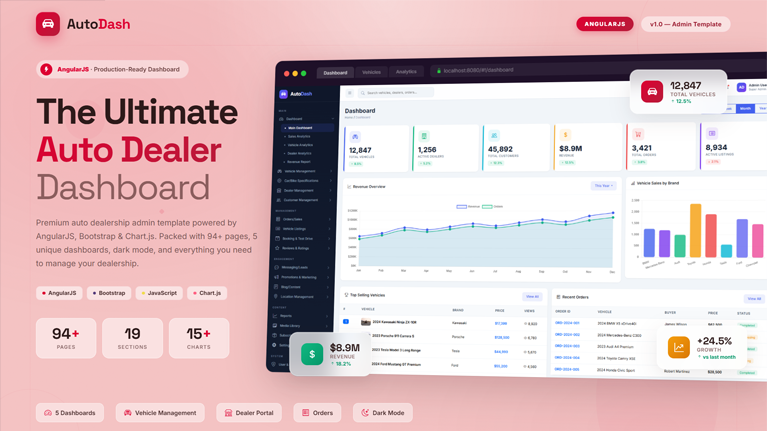
AutoDash is a premium AngularJS admin dashboard template that you can use to build powerful automobile dealership platforms. It delivers a complete set of ready-to-use interfaces for car marketplaces, multi-dealer vehicle portals, and single dealership management systems. As a result, you save weeks of development time and launch your auto business platform faster than ever before. The template combines modern design principles with practical functionality, so every page looks stunning while serving a real business purpose. Whether you manage a small dealership or a large vehicle marketplace, AutoDash adapts perfectly to your workflow and business requirements.
Built with AngularJS, Bootstrap, and Chart.js, AutoDash leverages the powerful two-way data binding and dependency injection patterns that AngularJS is known for. The codebase follows clean, well-structured JavaScript patterns with modular controllers, services, and directives that are easy to read, customize, and extend. You get a fully client-side rendered application out of the box, making deployment to any web server effortless. In addition, the lightweight architecture ensures fast loading speeds and outstanding performance across all modern browsers.
What Makes AutoDash Special?
AutoDash stands apart from generic admin templates because every page targets a specific auto dealership need. You get 94+ fully designed pages organized into 19 logical menu sections that cover the entire dealership workflow. Each page includes realistic data, interactive elements, working search filters, sortable tables, modal dialogs, and form validation patterns powered by AngularJS directives. Furthermore, all layouts respond beautifully on desktop, tablet, and mobile devices without breaking any visual element. This attention to detail means you spend less time fixing layouts and more time building your actual business logic.
Five Powerful Dashboard Views
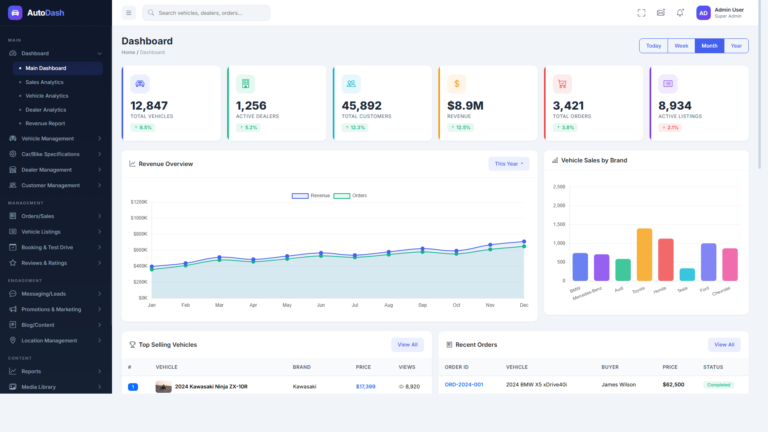
AutoDash ships with five unique dashboard views, and each one targets a different aspect of your business. The main dashboard gives you a bird’s-eye overview with six stat cards that display total vehicles, active dealers, customers, revenue, orders, and active listings. Additionally, it features a revenue overview chart with weekly, monthly, and yearly toggles alongside a vehicle sales by brand bar chart. Below these charts, you find a top-selling vehicles section with images and prices next to a recent orders table with color-coded status badges.
Beyond the main view, specialized dashboards help you drill deeper into your data. The Sales Analytics dashboard reveals purchase patterns, conversion funnels, and revenue breakdowns by payment method. Meanwhile, the Vehicle Analytics dashboard tracks inventory performance, listing views, and category distribution. The Dealer Analytics view ranks dealer performance by revenue, ratings, and response times. Finally, the Revenue Report dashboard compares monthly income against expenses and calculates net profit margins with growth rate indicators. All five dashboards use Chart.js with AngularJS directives, providing animated, interactive charts that include formatted tooltips and responsive resizing.
Complete Vehicle Inventory Management
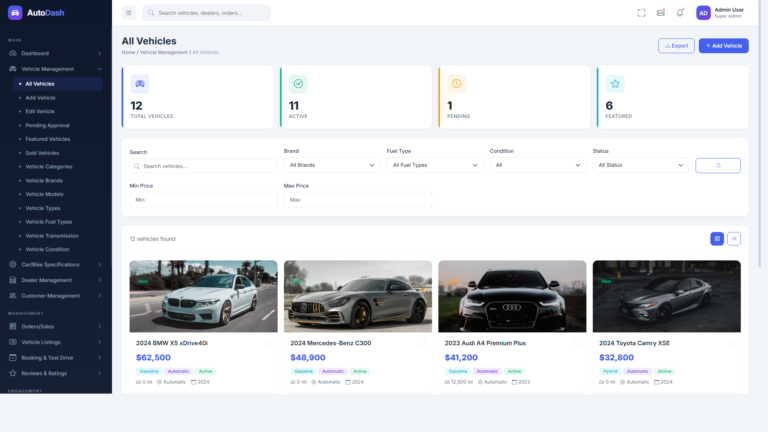
Managing your vehicle inventory becomes effortless with 13 dedicated pages that cover every aspect of catalog control. The All Vehicles page presents a searchable data grid with vehicle images, specifications, pricing, dealer assignments, and status indicators. You can filter vehicles by brand, category, fuel type, transmission, and condition to find exactly what you need. On top of that, dedicated Add and Edit Vehicle pages provide comprehensive multi-tab forms with sections for basic information, specifications, media uploads, pricing, and SEO metadata. These forms include real-time validation powered by AngularJS form directives that catch errors before submission.
AutoDash also gives you full control over your vehicle taxonomy through separate management pages. You can create and organize categories, brands, models, vehicle types, fuel types, transmission types, and vehicle conditions from their own dedicated interfaces. Moreover, the template includes specialized views for pending approval vehicles, featured listings, and sold vehicles with buyer information. This workflow-oriented approach ensures that every vehicle moves smoothly through your approval pipeline without any listing falling through the cracks.
Dealer Management and Onboarding System
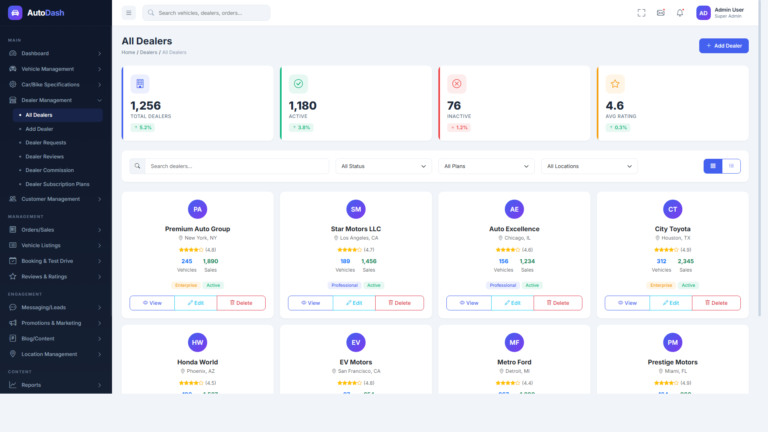
The dealer management module spans six specialized pages that handle the entire dealer lifecycle from application to performance tracking. The All Dealers page displays dealer profiles with contact information, location data, vehicle counts, revenue figures, star ratings, and subscription plan badges. When new dealers apply, the Dealer Requests page provides a streamlined review workflow with expandable detail rows. These rows show business license numbers, tax IDs, website URLs, expected vehicle volumes, and preferred subscription plans. As a result, you can make informed approval decisions without switching between multiple screens.
Processing dealer applications takes minimal effort thanks to bulk operations. You select multiple applications with checkboxes and approve or reject them in a single action. Additionally, the module includes a commission tracking page that monitors dealer earnings and platform fees. A subscription plan management page lets you define pricing tiers with feature comparisons, and a dealer reviews page displays customer feedback with star ratings and response capabilities. Together, these tools create a complete ecosystem for building and maintaining strong dealer relationships.
Orders, Sales, and Payment Processing
AutoDash handles transaction management through five well-designed pages that track every sale from order placement to delivery. The All Orders page shows order IDs, vehicle details, buyer and dealer information, pricing, payment methods, dates, and delivery status with color-coded badges. You can search, filter, and sort orders to quickly locate any transaction. In addition, a purchase history page with date range filtering and export functionality enables detailed transaction auditing for accounting purposes.
Financial tracking goes beyond basic order management. The payment transactions page monitors every financial movement with transaction types, amounts, and processing status. Meanwhile, the invoice management section includes a professional invoice template with print and PDF export capabilities that you can share directly with customers. The refund requests page rounds out this module with a structured workflow for reviewing, approving, or denying refund claims. Each request displays customer details, original order references, refund amounts, and categorized reasons that help you identify patterns and improve your service quality.
Customer Relationship Management
Building strong customer relationships drives dealership success, and AutoDash provides five dedicated pages for this purpose. The All Customers page presents customer profiles with avatars, contact details, registration dates, total orders, spending amounts, and loyalty status indicators. You can quickly assess each customer’s value and engagement level from this single view. Furthermore, individual customer profiles offer deeper insights with purchase history timelines, review activity logs, and saved vehicle lists that reveal buying intent.
Understanding customer behavior becomes straightforward with the remaining CRM pages. The saved vehicles page shows which customers have bookmarked which listings, giving your sales team valuable lead signals. Customer reviews with star ratings and detailed feedback enable reputation management across your platform. Similarly, the customer inquiries page tracks all incoming questions with status tracking, agent assignment capabilities, and response time metrics. This comprehensive approach ensures that every potential buyer receives timely attention and personalized follow-up.
Interactive Charts and Data Visualization
Data-driven decisions separate successful dealerships from struggling ones, and AutoDash puts powerful analytics at your fingertips. The template integrates over 15 unique Chart.js implementations through custom AngularJS directives across all dashboard and report pages. Revenue trends use smooth line charts with gradient fills, point hover effects, and previous-year comparison overlays that highlight growth patterns. Sales breakdowns by category and brand utilize vertical and horizontal bar charts with rounded corners and custom color schemes that match your dashboard theme.
More complex data relationships come alive through specialized chart types. Payment method distributions and commission tier breakdowns use doughnut charts with customizable cutout percentages and animated hover effects. The revenue versus expenses comparison combines grouped bar charts with an overlaid line chart for net profit visualization. Consequently, managers can spot trends, identify opportunities, and address problems before they impact the bottom line. Every chart renders through AngularJS directives, resizes responsively, and includes formatted tooltips with proper currency and number formatting.
AngularJS MVC Architecture
AutoDash is built on AngularJS’s powerful MVC (Model-View-Controller) architecture, leveraging two-way data binding, dependency injection, and modular design patterns. The application structure uses a clean, organized module system with dedicated controllers, services, factories, and directives for each feature area. Each module contains its own controllers and templates, making the codebase intuitive to navigate and extend. The routing system uses UI-Router for nested state management, enabling complex multi-view layouts with shared navigation elements like the sidebar, header, and breadcrumbs across all pages without redundant code.
The AngularJS architecture enables powerful capabilities including lazy loading of modules, clean URL routing with HTML5 mode support, and smooth state transitions between views. JavaScript is used throughout the entire codebase following best practices with well-documented controllers, reusable services for API communication, and custom directives for UI components. The component architecture follows AngularJS best practices with reusable directives in a dedicated components directory, keeping the code DRY and maintainable. The fully client-side rendered application means you can deploy AutoDash to any web server including Apache, Nginx, or any static hosting provider.
Smart Sidebar Navigation System
Navigating 94+ pages demands an intelligent menu system, and AutoDash delivers exactly that. The expanded sidebar features an accordion menu where only one parent section opens at a time. This approach prevents information overload and keeps related pages grouped logically together. Active menu items and parent sections highlight automatically based on the current route state, so you always know where you are within the application. The sidebar also displays section labels and page counts that help new users orient themselves quickly.
When you need more screen space, the sidebar collapses into a compact icon-only mode. Hovering over any menu icon triggers an elegant flyout panel that displays the full section label and all child page links with smooth animation. The flyout intelligently repositions itself to stay within viewport boundaries, which prevents any overflow issues on smaller screens. On mobile devices, the sidebar transforms into a full-height overlay with a dismissible backdrop. As a result, navigation remains consistent and intuitive regardless of the device your team uses.
Messaging and Lead Management
Converting inquiries into sales requires efficient communication tools, and AutoDash includes four pages designed specifically for this workflow. The Buyer Inquiries page features a complete chat interface with conversation threads, message bubbles, timestamps, and a compose area with attachment support. This familiar messaging layout helps your team respond quickly and maintain conversation context. Meanwhile, the Dealer Messages page provides a split-panel layout with contact lists, online status indicators, message previews, and full conversation history.
Lead management capabilities extend beyond simple messaging. The Contact Requests page displays incoming form submissions with names, emails, phone numbers, subjects, and message content alongside an assignment workflow. More importantly, the Lead Management page offers a comprehensive pipeline view with lead sources, assigned agents, follow-up dates, and conversion probability scores. Activity timelines track every interaction, which helps sales teams prioritize high-value opportunities and maintain consistent follow-up cadences. Together, these tools turn casual inquiries into closed deals.
Promotions and Marketing Tools
Driving traffic and boosting sales requires strong marketing capabilities, and AutoDash delivers five dedicated pages for this purpose. The Featured Listings page lets you promote specific vehicles with start and end dates, position priority settings, and performance metrics that show views and click-through rates. Additionally, the Advertisement Banners page provides a visual management interface for hero banners, sidebar ads, and inline promotions with image previews, target URLs, and impression tracking. These tools give you complete control over your platform’s promotional content.
Discount management and outreach tools complete the marketing suite. The Coupon Codes page offers a full discount system with percentage and fixed-amount options, usage limits, expiration dates, and redemption tracking. For direct communication, the Email Campaigns page provides a template-based campaign builder with recipient segmentation, scheduling, and delivery statistics. The Push Notifications page rounds out the module with message composition, audience targeting, and send history. Consequently, you can reach your customers through multiple channels and track the performance of every campaign you run.
Comprehensive Reports and Analytics
Making informed business decisions requires reliable data, and AutoDash provides five detailed report pages for this purpose. The Sales Report combines tabular data with visual charts that show revenue trends, top-performing vehicles, and sales velocity metrics over customizable date ranges. Vehicle Performance reports track views, inquiries, test drive requests, and conversion rates for individual listings. As a result, dealers can optimize their inventory presentation based on actual performance data rather than guesswork.
Performance tracking extends to every stakeholder in your platform. Dealer Performance reports rank dealers by revenue, customer satisfaction scores, response times, and listing quality metrics. Customer Activity reports reveal registration trends, engagement patterns, and lifetime value distributions that inform your retention strategy. Finally, the Revenue Report delivers month-over-month comparisons with revenue, expenses, net profit, margins, and growth rate calculations in a detailed financial table. These reports provide the foundation for strategic planning and continuous business improvement.
Vehicle Listings and Booking Management
AutoDash includes dedicated modules for listing lifecycle management and customer bookings. The Vehicle Listings section provides five pages that track active, pending, expired, and boosted listings alongside listing package management. You can monitor which listings perform best and allocate promotional budgets accordingly. Furthermore, the Bookings and Test Drives module handles test drive requests, scheduled appointments, and overall booking management through three focused pages that keep your team organized and responsive.
These modules work together to create a seamless customer journey. When a buyer discovers a vehicle through your featured listings, they can request a test drive directly from the platform. Your team receives the request with all relevant details, schedules the appointment, and tracks the outcome. This end-to-end visibility eliminates scheduling conflicts and ensures that no interested buyer slips away due to missed follow-ups. In addition, the listing packages page lets you create tiered listing plans with different visibility levels and durations.
Blog, Content, and Location Management
Content marketing plays a crucial role in attracting organic traffic, and AutoDash supports this strategy with a complete blog management system. You get five pages for managing posts, adding new content, organizing categories, assigning tags, and moderating comments. Each page includes the search, filter, and pagination patterns that remain consistent throughout the template. Moreover, the content management interface follows the same intuitive design patterns as the rest of the dashboard, so your team needs minimal training to start publishing.
Location management adds another layer of functionality that multi-region dealerships need. Four dedicated pages let you manage countries, states, cities, and dealer locations with hierarchical relationships. This geographic data powers location-based filtering throughout the platform, which helps buyers find vehicles near them. Similarly, the media management module provides three pages for organizing images, videos, and documents with upload capabilities, preview functionality, and bulk management operations that keep your digital assets organized.
Settings, Security, and Support
Every business platform needs robust configuration options, and AutoDash covers this area thoroughly. The settings module includes pages for general configuration, payment gateway setup, email server settings, SMS integration, SEO parameters, and currency management. Each settings page presents options in well-organized form layouts with clear labels and helpful descriptions. Additionally, the user management section provides admin user profiles, role-based access control with granular permissions, and activity logs that track every administrative action for audit compliance.
Customer support tools complete the administrative toolkit. The Support Tickets page displays customer issues with priority levels, status tracking, department assignment, and resolution timelines. A searchable FAQ management page lets you build a self-service knowledge base that reduces support volume. The Help Center page provides a structured documentation interface where you can organize help articles by topic. Together, these features ensure that both your internal team and your end users have the tools they need to resolve issues quickly and maintain platform satisfaction.
Responsive Design and Modern Technology
AutoDash takes a mobile-first approach to responsive design that delivers a flawless experience across all screen sizes. The layout system uses Bootstrap’s flexible grid with carefully tuned breakpoints at 576px, 768px, 992px, and 1200px. Cards, tables, charts, and forms gracefully adapt their structure at each breakpoint without losing data or functionality. Tables become horizontally scrollable on small screens while maintaining all columns, and charts resize dynamically using Chart.js responsive mode with custom AngularJS directives. As a result, your team can manage the platform effectively from any device.
The visual design system uses CSS custom properties and SCSS variables that make theme customization straightforward. You can change the entire color scheme by modifying a handful of root variables, and every component updates automatically. Typography uses the Inter font family with carefully selected weights that create a professional and highly readable interface. The entire codebase is written in clean JavaScript following AngularJS best practices with modular controllers, injectable services, and reusable directives. Built on AngularJS with Bootstrap and Chart.js, the template leverages proven, battle-tested technologies without any jQuery dependency for DOM manipulation, keeping the bundle lean and performance excellent.
Subscription and Pricing Management
Monetizing your platform becomes simple with the built-in subscription management module. AutoDash includes four pages that handle pricing plans, dealer packages, listing packages, and payment history. The pricing plans page displays tiered options with feature comparisons, pricing details, and subscriber counts. Dealer packages let you create different membership levels with varying benefits such as listing limits, featured placement credits, and priority support access.
Listing packages provide another revenue stream by offering sellers premium visibility options. Each package defines a duration, number of included listings, boost credits, and pricing with clear feature breakdowns. The payment history page tracks all subscription-related transactions with subscriber details, plan information, amounts, payment methods, and renewal dates. Consequently, you maintain complete financial visibility over your platform’s recurring revenue streams and can optimize pricing strategies based on actual conversion data.
Reviews, Ratings, and Quality Control
Maintaining trust on your platform requires active review management, and AutoDash provides three focused pages for this task. The Vehicle Reviews page displays customer feedback for specific listings with star ratings, review text, reviewer information, and submission dates. The Dealer Reviews page covers dealer-level feedback with aggregate ratings and individual review details. Both pages include response capabilities that let dealers and administrators address customer concerns publicly.
Quality control goes further with the Review Moderation page. This interface presents flagged and pending reviews with moderation actions including approval, rejection, and editing capabilities. Filters let moderators focus on specific review types, rating ranges, or flagged content. As a result, you can maintain high content quality standards while giving legitimate reviewers a platform to share their experiences. This transparent approach builds trust with both buyers and dealers on your platform.
Product Information
-
0+Sales
-
TechnologiesHTML CSS JavaScript jQuery Bootstrap