Talenta – HR Management Admin Template

HTML5 CSS3 JavaScript Bootstrap
Need Help ?
Talenta – HR Management Admin Template - Premium Template

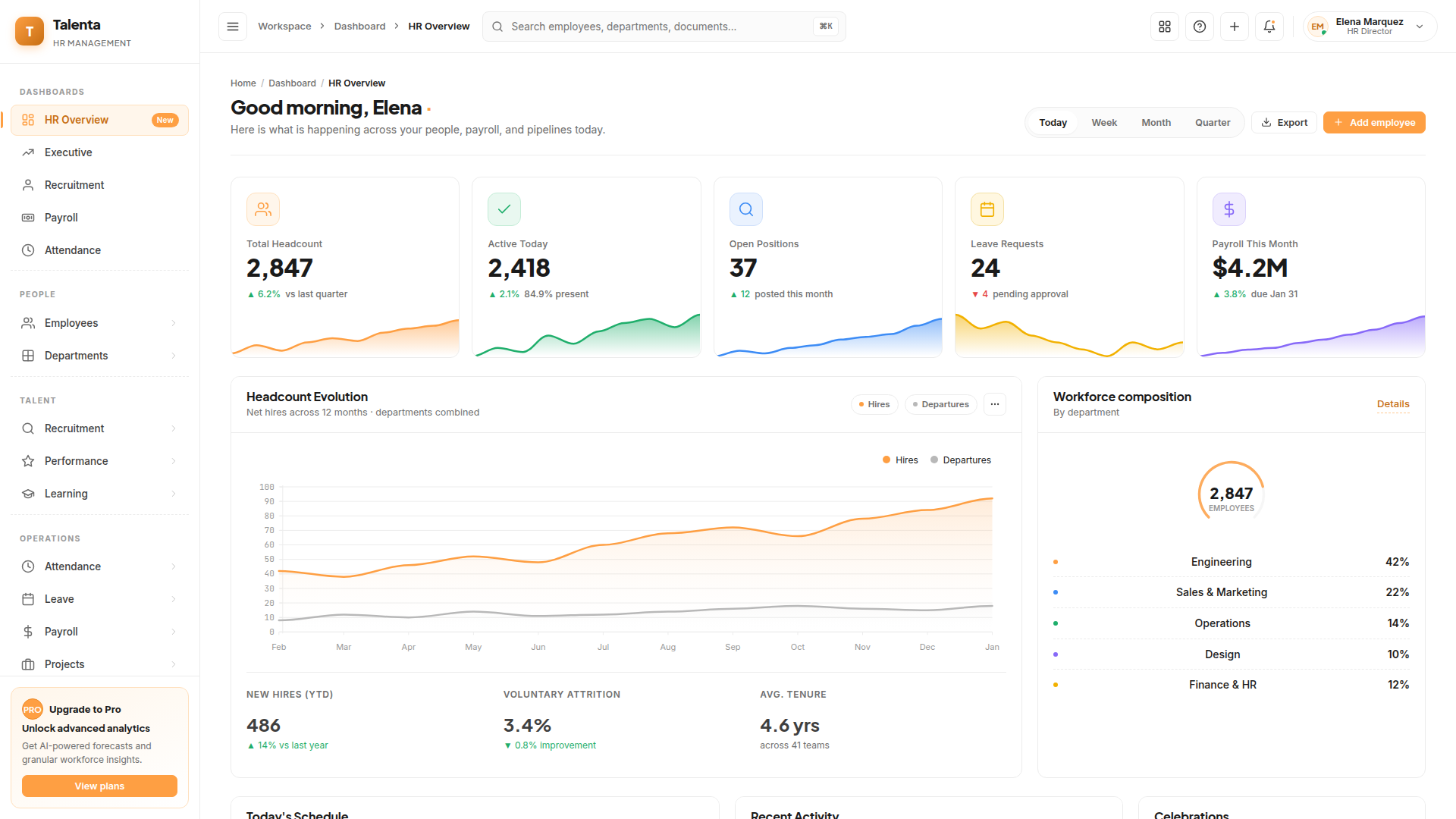
Talenta HR Management is a premium, production-ready Bootstrap 5 admin template designed for modern HR, people-operations and workforce-management products. Built on a pure-white surface with a single brand accent, the template ships with 115+ pre-designed HTML pages that cover the full employee lifecycle — from hiring and onboarding through attendance, payroll, performance, training and offboarding.

Clear Documentation

Premium Support

Regular Updates

Need Help? We're Here For You

Our dedicated support team is available 24/7 to help you with any questions or issues. Get in touch with us anytime.

24/7

Availability

Fast Response

Time

Expert

Assistance

Flexible pricing plans tailored for your business

Discover our range of professionally designed templates.

100% Moneyback Guarantee
Secure Checkout · Instant Download · Risk Free

Single Use

For a single end product, with no user fees.

$24
Purchase Now
  • Full source code
  • Documentation
  • Use in SaaS app
  • Projects 1

Multiple Use

For a single end product, with no user fees.

$49
Purchase Now
  • Full source code
  • Documentation
  • Use in SaaS app
  • Projects 3

Extended Use

For a single end product, with no user fees.

$199
Purchase Now
  • Full source code
  • Documentation
  • Use in SaaS app
  • Projects Unlimited

For Business

For multiple end products with user charges.

$299
Purchase Now
  • Full source code
  • Documentation
  • Use in SaaS app
  • Projects Unlimited

Description

9 / 100 SEO Score

Talenta HR Management is a premium, production-ready Bootstrap 5 admin template designed for modern HR, people-operations and workforce-management products. Built on a pure-white surface with a single brand accent, the template ships with 115+ pre-designed HTML pages that cover the full employee lifecycle — from hiring and onboarding through attendance, payroll, performance, training and offboarding.

Every screen has been carefully crafted with a bordered, light-only aesthetic that keeps focus on data, not chrome. The design system is driven by CSS custom properties, so re-skinning the entire template for your brand is a matter of editing a handful of variables. The layout adapts gracefully from desktop down to mobile, and the sidebar collapses to a compact rail without losing navigation context.

Dashboards and analytics

Five purpose-built dashboards — HR Overview, Attendance, Payroll, Recruitment and Executive — give decision-makers KPI cards with live sparklines, multi-series area charts, donut breakdowns, activity feeds and mini calendars. Charts are powered by ApexCharts with a graceful fallback to inline SVG when ApexCharts is not loaded, so every visualization renders out-of-the-box and stays responsive to its container width.

People management

Employee directory, organizational chart, employee profile with tabbed sections (overview, compensation, time and attendance, performance, documents, activity), wizard-style add and edit flows, bulk import, onboarding pipelines and offboarding checklists. Departments, teams and positions are managed through dedicated detail pages with full CRUD-ready markup.

Attendance and time

Real-time attendance tracker, shift planner, timesheets, billable-hours reports, leave overview, leave balance, leave calendar, leave policies and request approval flows. Each module includes filtering, status badges, bulk-action toolbars and printable report views.

Payroll, recruitment, performance and training

End-to-end payroll workflows — payroll run, payslips, payslip detail, bonuses, reimbursements, tax and salary structure — plus a complete applicant-tracking module covering jobs, candidates, candidate detail, pipeline kanban, interviews and offers. Performance reviews, goals, OKRs and 360-degree feedback are included, along with a training-and-certifications suite (courses, course detail, enrollments, calendar).

Projects, documents and reports

Project list, kanban and Gantt views, document repositories for policies, contracts and templates, and five reporting dashboards (overview, attendance, payroll, performance, recruitment) cover the operational long-tail of HR teams.

UI kit and developer experience

A dedicated UI showcase walks through every component the template ships with — alerts, buttons, cards, charts, colors, forms, icons, modals, tables and typography. Authentication flows (login, register, forgot password, reset password, two-factor, lock screen), system pages (404, 500, maintenance, coming-soon) and a pricing page round out the package. The codebase is plain HTML, CSS and vanilla JavaScript — no build step, no framework lock-in. Drop the assets folder into any backend (PHP, Node, Rails, Django, .NET) and start wiring up data.

Highlights at a glance

  • 115+ fully designed HTML pages across HR, payroll, recruitment, performance and projects
  • Bootstrap 5.3 with a custom design system built on CSS custom properties
  • Pure-white light theme with a single configurable brand accent
  • ApexCharts integration with a graceful inline-SVG fallback
  • Responsive sidebar with collapsible groups and a compact rail mode
  • Tabbed detail pages, wizard flows, kanban boards and Gantt timelines
  • Inter, Plus Jakarta Sans and JetBrains Mono web fonts pre-wired
  • Zero inline styles — every visual rule lives in a single CSS file
  • Vanilla JavaScript — no build pipeline required
  • SEO-friendly markup with semantic headings and meta tags on every page

Why Developers Choose Us

Our templates include everything you need to create modern, scalable websites with ease.

Responsive Design

Every template is fully responsive and looks stunning on all devices - from mobile to desktop.

Lightning Fast

Optimized for performance with minimal CSS and no dependencies. Your site will load in milliseconds.

Easy Customization

Easily customize layouts, colors, typography, and components to match your brand identity.

Clean Code

Well-organized, commented code that's easy to understand and modify for your needs.

Regular Updates

Get free lifetime updates with new features, improvements, and security patches.

Premium Support

Get help when you need it with our dedicated support team available 24/7.

Frequently Asked Questions

Find answers to the most common questions about orders, shipping, returns, and more.

Still have a question?

We're here to help! Reach out to our support team and we'll get back to you as soon as possible.

What is an admin dashboard template and how is it used in web applications?
An admin dashboard template is the control room of a web application. Every serious product has one. It is where administrators manage users, teams monitor activity, and product managers watch performance numbers move in real time. Instead of designing and building this interface from scratch, developers start with a template that already contains the structural UI layer required for operations. Inside it live dashboards, reporting panels, tables that hold thousands of records, configuration pages, and system controls. Engineers connect their backend services to this interface and immediately gain a working operational console. That shortcut removes a large portion of repetitive interface development that most web applications eventually require.
Which frameworks do modern admin dashboard templates usually support?
Admin dashboards rarely exist in isolation. They must fit directly into the development stack already running the product. For that reason most modern dashboard templates support several popular front-end frameworks. React appears most often because its component system fits data-heavy interfaces extremely well. Next.js commonly follows when teams want server rendering and efficient routing. Angular remains common inside enterprise environments where applications grow large and structured. Vue attracts teams who prefer lightweight reactive frameworks. Bootstrap dashboards remain useful for rapid interface deployment, while Tailwind dashboards provide extremely flexible styling systems. Supporting these frameworks allows teams to integrate dashboards into existing projects without reworking their entire codebase.
What features should a high-quality admin dashboard template include?
A capable admin dashboard template operates like the operating system of the application’s internal environment. It brings together multiple UI elements that administrators rely on constantly. Analytics dashboards visualize performance data through charts and graphs. Large data tables allow teams to browse and manage records such as users, transactions, or inventory items. Forms enable structured workflows like product creation or account management. Authentication pages handle system access. Notification panels show system events. Reporting modules summarize trends. Navigation systems tie everything together so users can move quickly between operational areas. When those components already exist, development teams skip weeks of repetitive interface work.
How much development time can an admin dashboard template save?
Admin dashboard templates compress the entire development phase dramatically. The UI infrastructure already exists. Developers move straight into connecting APIs, integrating databases, and wiring business logic into the interface. A dashboard template removes weeks of front-end engineering work and allows product features to reach production much faster.
Are admin dashboard templates suitable for large SaaS platforms?
Yes, and many SaaS products actually begin that way. The administrative needs of SaaS platforms tend to follow familiar patterns. Teams need user management panels, analytics views, subscription data, reporting tools, configuration pages, and system monitoring dashboards. A strong dashboard template already contains the UI structure required for these operations. Developers then extend it by adding application-specific data layers and new modules as the product evolves. Startups benefit because they launch quickly with a polished operational interface. In short, admin dashboard templates are very well suited for large SaaS platforms.
Can developers customize admin dashboard templates easily?
Yes of course! In fact, customization is a major reason teams choose dashboard templates in the first place. No two applications display identical data or follow identical workflows. Therefore, developers usually use dashboards extensively once the template enters a project. This makes sure that entire modules such as billing systems, order management panels, or customer support tools often get introduced. Templates are useful because they can change the branding easily. Because dashboard templates rely on reusable UI components, developers extend the interface gradually without rewriting the foundation.
Which types of applications commonly use admin dashboard templates?
Admin dashboards appear almost everywhere modern software operates. SaaS platforms depend on them to manage users and monitor product performance. Ecommerce companies operate inventory systems, orders, and sales metrics through dashboards. CRM tools use dashboard panels to organize the customer records and communication history. Even analytics platforms use them to visulaize reporting data.  Some enterprise tools depend on dashboards to track operations and system activity. Some marketplaces and fintech applications also depend heavily on administrative interfaces.

Explore Top Selling Admin Templates

Discover our most popular modern, responsive, and developer-friendly admin dashboard templates.

News & Articles

Discover our most popular modern, responsive, and developer-friendly admin dashboard templates.

Subscribe to our newsletter

From strategy to execution, we help you create powerful digital experiences that drive real results.

Stay Updated No spam, unsubscribe anytime.