

Why Choose PropVista for Your Real Estate Business?
Managing real estate operations requires a dashboard that handles multiple workflows at once. PropVista solves this problem by combining property management, CRM, financial tracking, and analytics into a single admin template.
Unlike generic admin templates, PropVista focuses entirely on the real estate industry. Every page, component, and module serves a specific purpose for property managers, real estate agencies, and developers. This targeted approach saves you weeks of custom development work.
Additionally, PropVista follows modern design principles with a consistent color scheme, smooth animations, and thoughtful spacing. Your team will find the interface intuitive from day one, which reduces training time and boosts productivity.
Powerful Dashboard with 6 Unique Variants
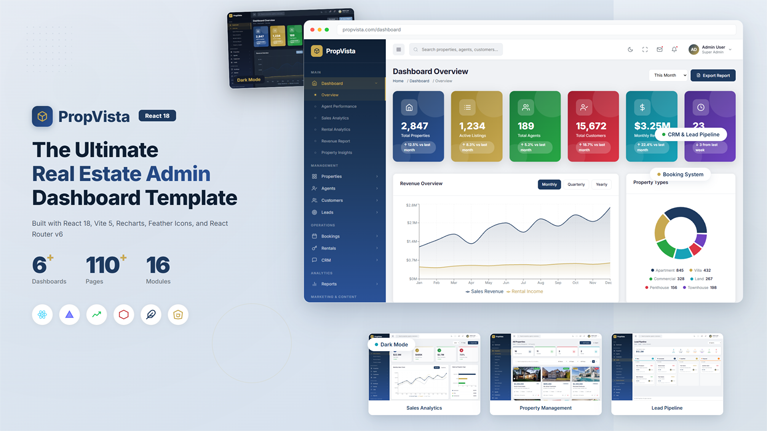
The dashboard serves as the command center for your real estate operations. PropVista includes six distinct dashboard layouts, each designed for a different use case. You can choose the layout that best fits your business needs.
Overview Dashboard
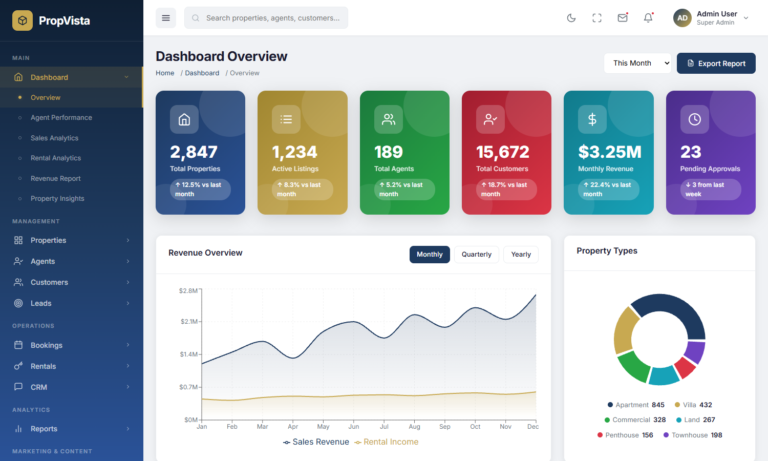
The main overview dashboard presents key performance indicators at a glance. You can monitor total properties, active leads, recent bookings, and revenue figures without navigating away from the home screen. Interactive charts update in real time, so you always see the latest data.
Sales Analytics Dashboard
This dashboard breaks down your sales performance with detailed charts and comparison graphs. You can track monthly trends, compare quarterly results, and identify your best-performing property types. Consequently, your sales team makes data-driven decisions with confidence.
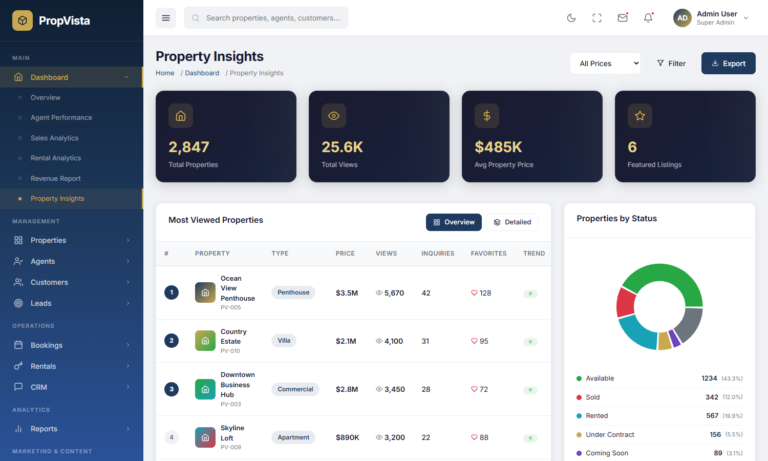
Property Insights Dashboard
The property insights view focuses on listing performance and market trends. It highlights occupancy rates, average listing duration, and price-per-square-foot metrics. Moreover, you can filter by property type, location, or date range to drill into specific segments.
Revenue Dashboard
Financial clarity matters for every real estate business. The revenue dashboard tracks income streams, commission payouts, expense categories, and profit margins. Clear visualizations help you spot revenue trends early and adjust your strategy accordingly.
Lead Analytics and Booking Dashboards
Two additional dashboards cover lead conversion funnels and booking pipeline metrics. These views help you understand where leads come from, how quickly they convert, and which agents close the most deals. In turn, you can allocate resources more effectively across your team.
Complete Property Management System
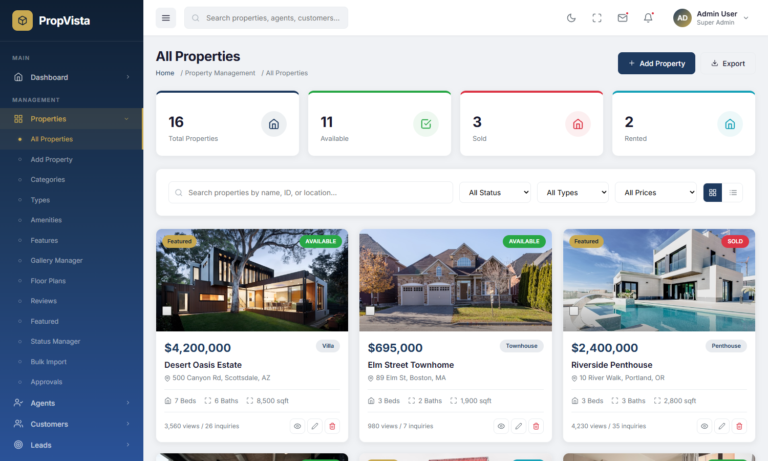
Property management sits at the heart of any real estate admin panel. PropVista delivers 13 dedicated pages that cover every aspect of property listing and management. From adding new properties to tracking approvals, the entire workflow lives inside your dashboard.
Property Listings and Categories
You can create, edit, and organize property listings with a rich form interface. Each listing supports multiple images, floor plans, amenity tags, and detailed descriptions. Furthermore, the category system lets you group properties by type, such as residential, commercial, or industrial.
Gallery and Floor Plans
Visual presentation drives property sales. PropVista includes a built-in gallery manager where you can upload, reorder, and crop property images. The floor plan viewer displays interactive layouts that help potential buyers understand the property structure before visiting in person.
Approval Workflow
When multiple agents submit listings, you need a reliable approval process. The approval system routes new listings through admin review before they go live. Admins can approve, reject, or request changes directly from the dashboard. This ensures every published listing meets your quality standards.
Amenities and Features Management
Each property listing supports a detailed amenity checklist. You can define custom amenities like swimming pool, parking, gym access, or garden space. These amenities appear as filterable tags, which helps buyers narrow down their search quickly.
Agent Management and Performance Tracking
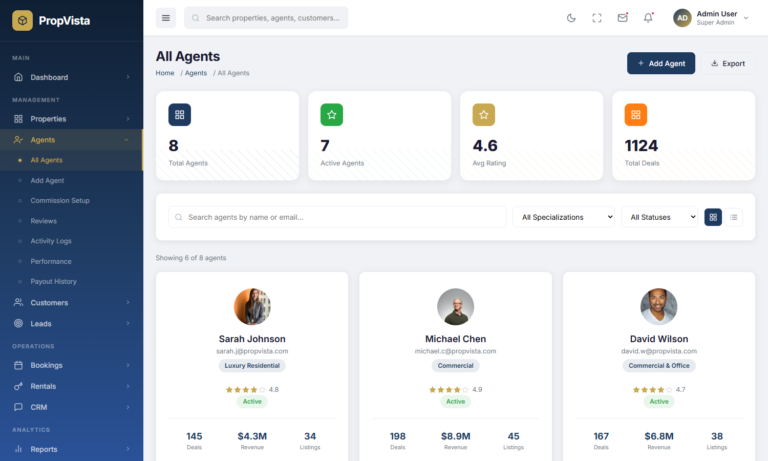
Your agents drive revenue. PropVista provides comprehensive tools to manage agent profiles, track performance, and handle commissions. Everything an agency owner needs to monitor their team is available in one place.
Agent Profiles and Onboarding
Each agent gets a detailed profile page that displays their contact information, assigned properties, and performance metrics. The onboarding flow captures essential documents and certifications. Therefore, you maintain a complete record for every team member.
Commission Setup and Payouts
Configuring commission structures is straightforward with PropVista. You can set percentage-based or flat-fee commissions per agent, property type, or deal size. The payout history page tracks every payment, which simplifies accounting at the end of each month.
Performance Reviews and Ratings
The performance module displays metrics like deals closed, revenue generated, and customer satisfaction scores. Agents can also receive star ratings and written reviews from clients. These insights help you identify top performers and provide targeted coaching to others.
Built-in CRM and Lead Management
Converting leads into customers requires a structured pipeline. PropVista includes a full CRM system with lead tracking, follow-up reminders, and conversion analytics. You manage the entire lead lifecycle without switching to a separate tool.
Visual Lead Pipeline
The Kanban-style pipeline board lets you drag leads through stages like New, Contacted, Qualified, Negotiation, and Closed. Each lead card shows the source, assigned agent, and last activity. As a result, your team always knows where every lead stands in the sales process.
Lead Source Tracking
Understanding where leads originate helps you invest in the right marketing channels. PropVista tracks lead sources such as website forms, phone calls, referrals, and social media campaigns. You can view source performance reports and allocate your budget more effectively.
Follow-up Reminders and Templates
Timely follow-ups close more deals. The built-in reminder system notifies agents when a follow-up is due. Pre-built email and SMS templates speed up outreach, while the template editor lets you customize messages for different scenarios. Consequently, your response time improves across the board.
Conversion Reports
The conversion analytics page shows how many leads move through each pipeline stage. You can filter by date range, agent, or source to pinpoint bottlenecks. These reports give you actionable insights that directly improve your close rate.
Comprehensive Booking and Contract System
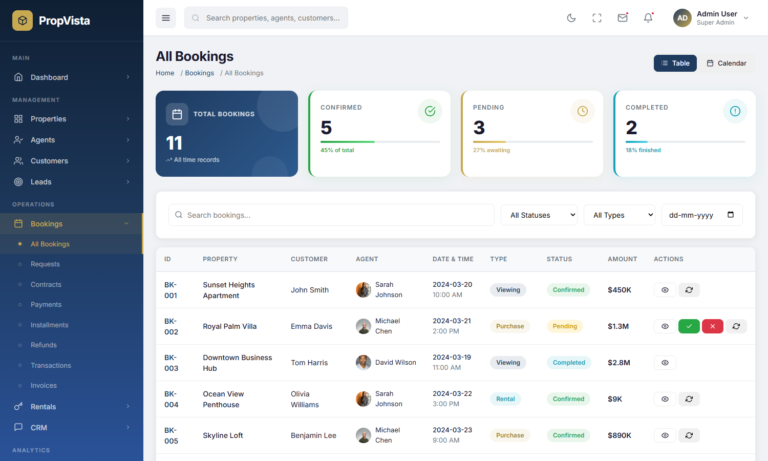
Once a lead converts, the booking system takes over. PropVista handles everything from initial booking requests to signed contracts and payment tracking. This seamless handoff ensures nothing falls through the cracks during the closing process.
Booking Requests and Management
New booking requests appear in a centralized queue where admins can review property details, buyer information, and requested dates. You can approve, reschedule, or decline requests with a single click. The status tracker keeps everyone informed about each booking’s progress.
Contracts and Agreements
The contract management page stores all signed agreements in one accessible location. You can upload documents, set expiration dates, and link contracts to specific properties and customers. This organized approach eliminates the hassle of searching through email attachments or paper files.
Payments and Installments
PropVista supports multiple payment structures, including full payment, installment plans, and partial deposits. The payment tracker displays due dates, received amounts, and outstanding balances. Additionally, automated invoice generation saves your finance team hours of manual work every week.
Refund Processing
When cancellations happen, the refund module streamlines the process. You can calculate refund amounts based on your cancellation policy, issue refunds, and maintain a clear audit trail. This transparency builds trust with your customers and reduces disputes.
Rental Management for Property Owners
PropVista goes beyond sales with a dedicated rental management module. If your business handles rental properties, you can manage agreements, tenants, and maintenance requests all from the same dashboard.
Rental Agreements and Tenant Profiles
Create and manage rental agreements with clear start and end dates, monthly rent amounts, and deposit details. Each tenant gets a profile page with contact information, payment history, and document uploads. As a result, you have complete visibility into every rental relationship.
Rent Collection and Maintenance
The rent collection page tracks monthly payments, overdue amounts, and payment methods. Tenants can submit maintenance requests through the system, and your team can assign tasks, set priorities, and track completion. This end-to-end workflow keeps both landlords and tenants satisfied.
Finance and Accounting Tools
Financial management is critical for real estate businesses of any size. PropVista includes dedicated finance pages that help you track revenue, manage expenses, and generate profit and loss reports.
Commission and Tax Configuration
You can configure commission rates at the global level or customize them per agent and property type. The tax module handles GST, VAT, or any custom tax structure your business requires. These settings apply automatically to invoices and financial reports.
Expense Tracking and Profit Reports
Log business expenses by category, such as marketing, maintenance, or office costs. The profit and loss report aggregates revenue and expenses to show your bottom line. Moreover, you can export these reports for your accountant or tax filings.
Wallet and Payout System
The wallet feature tracks agent earnings and pending payouts in real time. Admins can approve bulk payouts or process individual transfers. This centralized approach prevents payment errors and gives agents visibility into their earnings.
Advanced Reports and Analytics
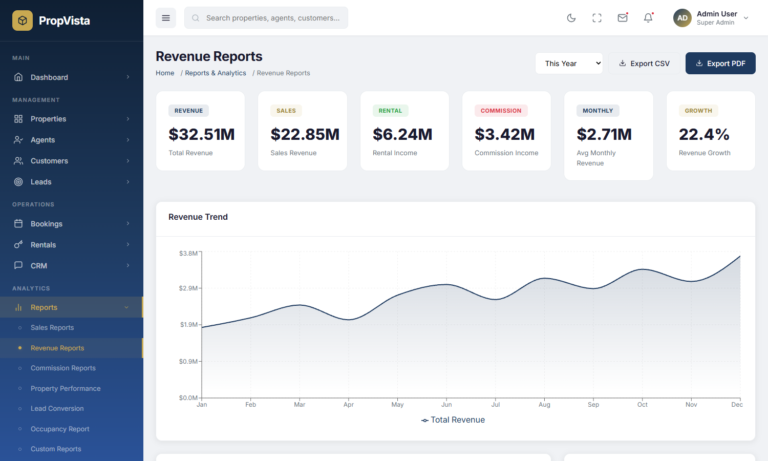
Data drives better decisions. PropVista ships with a comprehensive reporting module that covers sales, revenue, commissions, occupancy, and custom metrics. Every report features interactive charts powered by Recharts, a modern React charting library.
Sales and Revenue Reports
Track monthly and yearly sales volume alongside revenue trends. The comparison view lets you measure current performance against previous periods. Additionally, you can filter reports by property type, location, or agent to get granular insights.
Commission and Occupancy Reports
Commission reports break down earnings by agent, deal size, and time period. The occupancy report monitors rental property utilization rates across your portfolio. Together, these views help you optimize pricing and staffing decisions.
Custom Report Builder
When standard reports do not cover your needs, the custom report builder lets you create tailored views. Select your data fields, choose chart types, and apply filters to generate reports that answer your specific business questions.
Marketing and Campaign Management
Attracting new leads requires consistent marketing efforts. PropVista includes tools for managing banners, campaigns, discount coupons, and blog content. These features help you promote your listings and generate more inquiries.
Banner and Campaign Management
Create promotional banners for your website or app with the visual banner editor. The campaign manager tracks active promotions, their reach, and conversion metrics. You can schedule campaigns in advance and set automatic expiration dates.
SEO Settings and Blog
The SEO configuration page lets you set meta titles, descriptions, and Open Graph tags for your property pages. A built-in blog module supports content marketing with a rich text editor, categories, and publishing workflow. In turn, your organic search traffic grows steadily over time.
Coupon and Discount System
Create promotional coupons with percentage or flat discounts. You can set usage limits, expiration dates, and property-specific eligibility rules. This flexibility allows you to run targeted promotions that drive bookings during slow periods.
Content Management System
PropVista includes a CMS module for managing static pages, testimonials, FAQs, and media files. You can update your About page, edit contact information, or add new testimonials without touching any code.
Page and FAQ Management
The page editor supports rich text formatting with a WYSIWYG interface. You can create landing pages, policy pages, or any custom content page your website needs. The FAQ manager organizes questions by category and makes them easy to update.
Testimonials and Media Library
Showcase client reviews with the testimonials module. Each entry supports a photo, rating, and comment. The media library provides centralized file management where you can upload, organize, and reuse images and documents across your dashboard.
Communication and CRM Tools
Staying connected with clients and team members is essential. PropVista offers email templates, SMS integration, in-app notifications, and a chat interface. These tools keep your communication organized and accessible from one location.
Email and SMS Templates
Pre-built templates cover common scenarios like booking confirmations, follow-up reminders, and payment receipts. You can customize each template with dynamic fields such as customer name, property title, and booking date. This automation reduces manual effort significantly.
Notifications and Chat
The notification center alerts you to important events like new leads, overdue payments, and maintenance requests. A built-in chat interface enables real-time communication between agents and admins. Together, these features ensure your team responds quickly to every situation.
User Management and Access Control
Controlling who can access what is important in any multi-user system. PropVista includes a role-based access control system that lets you define custom roles and assign granular permissions to each team member.
Roles and Permissions
Create roles like Admin, Manager, Agent, and Viewer with specific access levels. Each role defines which pages, actions, and data a user can see or modify. This prevents unauthorized changes and keeps sensitive information secure.
Activity Logs
The activity log records every significant action performed in the dashboard. You can track who made changes, when they occurred, and what was modified. This audit trail supports accountability and helps you troubleshoot issues quickly.
Flexible Settings and Configuration
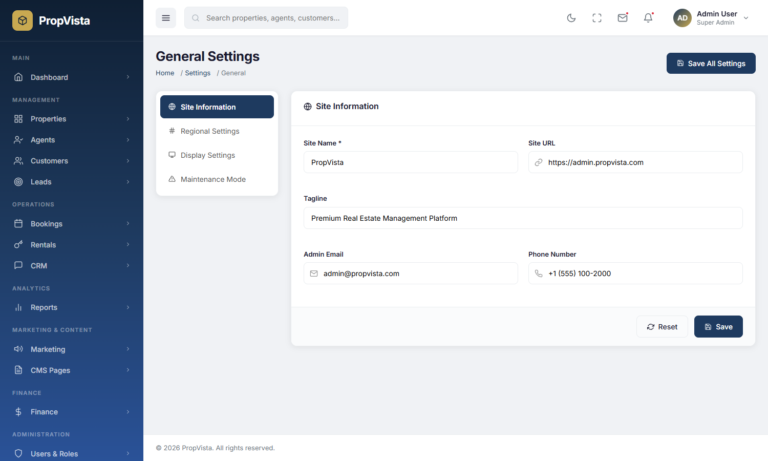
Every business operates differently. PropVista provides extensive settings pages that let you configure the template to match your exact requirements. You control everything from company branding to payment gateways.
General and Company Settings
Set your company name, logo, address, and contact details in one place. These values populate automatically across invoices, emails, and reports. Updating your branding takes just a few minutes with the visual settings editor.
Payment and Integration Settings
Configure payment gateways, email service providers, and SMS APIs from the integration settings page. PropVista supports multiple gateway configurations so you can offer different payment methods to your customers. Furthermore, API key management keeps your integrations secure and organized.
Theme and Backup Settings
Switch between light and dark themes or customize the primary color scheme from the theme settings page. The backup module lets you export your configuration and data for safekeeping. These options give you full control over the look and reliability of your admin panel.
Support Ticket System
Customer support drives retention. PropVista includes a built-in ticketing system where customers and tenants can submit issues. Your support team can categorize, prioritize, and resolve tickets efficiently from a dedicated interface.
Ticket Management and Knowledge Base
Each ticket captures the issue description, category, priority level, and assigned agent. The knowledge base module lets you publish help articles that answer common questions. As a result, your support volume decreases over time as customers find answers on their own.
Advanced Features and AI Tools
PropVista goes beyond standard admin functionality with several advanced features. These tools give your business a competitive edge by automating complex calculations and providing deeper market insights.
AI Property Price Estimator
The AI-powered price estimator analyzes property attributes like location, size, amenities, and market trends to suggest competitive pricing. This helps agents price listings accurately from the start, which reduces time on market and increases client satisfaction.
Heatmap and Market Analysis
The interactive heatmap visualizes property demand and pricing across different neighborhoods. You can identify hot markets, track pricing trends, and make informed investment decisions. This geographical view adds a strategic layer to your data analysis.
Mortgage Calculator
Help your clients estimate monthly payments with the built-in mortgage calculator. It supports variable interest rates, down payment percentages, and different loan terms. Agents can share these calculations during property showings to move deals forward.
Multi-Branch Support
If your agency operates from multiple locations, PropVista supports multi-branch management. Each branch maintains its own agents, properties, and reports while the central dashboard provides a unified overview. This structure scales easily as your business grows.
Built-in Dark Mode with Complete Styling
Eye strain matters, especially for teams that spend hours in the dashboard. PropVista includes a fully styled dark theme that covers every page, component, chart, and form element. Users can switch between light and dark modes with a single toggle in the header.
The dark mode is not an afterthought. Every background color, border shade, text contrast, and chart palette has been carefully adjusted for readability and visual comfort. Additionally, inline styles and third-party chart components receive proper dark mode overrides, which ensures a consistent experience throughout the entire template.
The theme preference persists across sessions using local storage. When a user selects dark mode, it remains active on every subsequent visit. This seamless persistence eliminates the need to toggle the theme repeatedly.
Fully Responsive Design for Every Device
Your team accesses the dashboard from desktops, tablets, and smartphones. PropVista adapts gracefully to every screen size with a mobile-first responsive layout. Tables convert to card views, charts resize proportionally, and navigation switches to a slide-out menu on smaller screens.
The collapsible sidebar adds another layer of flexibility. On desktop, you can toggle the sidebar to icon-only mode, which maximizes your content area. On mobile devices, the sidebar becomes a full overlay that slides in from the left. Moreover, the collapsed state persists across page navigations, so your preferred layout stays consistent.
Modern UI Components and 16+ Stat Card Styles
First impressions matter. PropVista features a polished design language with consistent typography, spacing, and color usage. The component library includes buttons, cards, tables, modals, tabs, badges, progress bars, and pagination controls that all follow the same design system.
The template showcases over 16 unique stat card styles, including neumorphic, gradient, stacked, floating, bordered, 3D, outlined, and spotlight variants. Each style gives your dashboard a distinct personality. You can mix and match these cards to create the exact visual hierarchy your users need.
Charts powered by Recharts deliver interactive data visualizations with smooth animations. Bar charts, line graphs, area charts, pie charts, and radar charts are all available out of the box. These charts automatically adjust their colors and labels based on the active theme mode.
Modern Tech Stack for Developers
PropVista uses a developer-friendly tech stack that prioritizes speed, maintainability, and scalability. Every technology choice supports long-term project health.
React 18 and Vite 5
React 18 provides the component architecture, while Vite 5 handles blazing-fast builds and hot module replacement during development. The combination means instant page loads in production and sub-second refresh times during development. Your development workflow stays smooth regardless of project size.
React Router and Recharts
Client-side routing with React Router delivers seamless page transitions without full page reloads. Recharts renders all data visualizations with a declarative, composable API that makes customization straightforward. Both libraries are well-documented and actively maintained by large open-source communities.
Custom CSS with Theme Variables
PropVista uses CSS custom properties for theming instead of heavy CSS-in-JS libraries. This approach keeps the bundle size small and makes theme customization as simple as changing a few variable values. The entire color scheme, spacing scale, and typography can be adjusted from a single file.
Feather Icons
Clean, consistent iconography comes from the Feather Icons library. Over 280 open-source icons cover every common UI need. Each icon is an SVG, which means crisp rendering at any size without additional image assets.
Who Should Use PropVista?
PropVista serves a wide range of real estate professionals and development teams. Here are the primary audiences that benefit most from this template.
Real Estate Agencies
Agencies that manage multiple agents, properties, and clients need a centralized dashboard. PropVista provides the structure and tools to run daily operations efficiently. From lead tracking to commission payouts, every workflow is covered.
Property Management Companies
Companies that manage rental portfolios benefit from the rental management and maintenance modules. Tenant profiles, rent collection, and maintenance tracking streamline property management operations considerably.
Real Estate Developers
Developers building custom real estate platforms save significant time by starting with PropVista. The 110+ pre-built pages and 16 modules provide a solid foundation. You can customize, extend, and integrate with your backend without building the UI from scratch.
Startups and SaaS Products
PropTech startups looking for a production-ready admin interface can launch faster with PropVista. The template handles the frontend complexity so your team can focus on backend logic, integrations, and business-specific features.
PropVista at a Glance
- 110+ pre-built pages covering every real estate admin need
- 16 complete business modules from properties to support tickets
- 6 unique dashboard layouts with interactive charts and KPIs
- Full dark mode with every component, chart, and page styled
- Collapsible sidebar with persistent state across sessions
- Mobile responsive design with adaptive layout for all screen sizes
- 16+ stat card styles including neumorphic, gradient, and 3D variants
- Built-in CRM with Kanban pipeline, follow-ups, and conversion reports
- Booking system with contracts, installments, invoices, and refunds
- Rental management with tenant profiles and maintenance tracking
- Finance module with commissions, expenses, and profit reports
- Marketing tools with campaigns, coupons, SEO settings, and blog
- Role-based access control with activity logging
- AI price estimator, heatmap, and mortgage calculator
- React 18, Vite 5, Recharts, React Router, and Feather Icons
- Clean, well-organized code with CSS custom properties for easy theming
Product Information
-
0+Sales
-
TechnologiesHTML CSS JavaScript jQuery Bootstrap