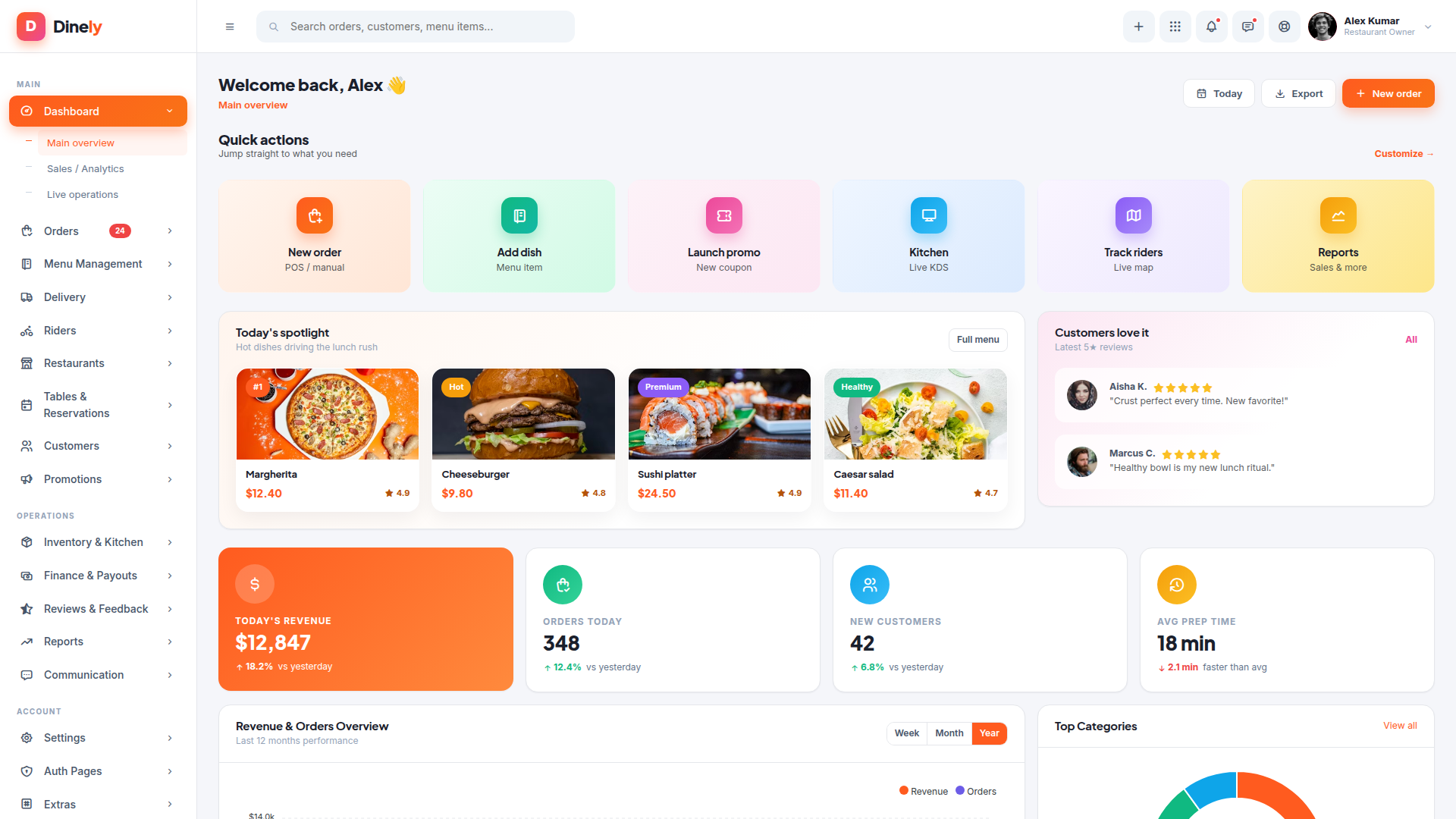
Dinely – Restaurant & Food Delivery Admin Dashboard Template

HTML5 CSS3 JavaScript Bootstrap
Need Help ?
Dinely – Restaurant & Food Delivery Admin Dashboard Template - Premium Template

Premium Bootstrap 5 admin template for restaurants, cloud kitchens, and food delivery marketplaces. 89 colorful, responsive HTML pages including live order board, Kitchen Display System, POS, rider tracking, table reservations, loyalty, payouts, reviews & reports. Zero inline styles, no jQuery, Tabler icons, ApexCharts.

Clear Documentation

Premium Support

Regular Updates

Need Help? We're Here For You

Our dedicated support team is available 24/7 to help you with any questions or issues. Get in touch with us anytime.

24/7

Availability

Fast Response

Time

Expert

Assistance

Flexible pricing plans tailored for your business

Discover our range of professionally designed templates.

100% Moneyback Guarantee
Secure Checkout · Instant Download · Risk Free

Single Use

For a single end product, with no user fees.

$24
Purchase Now
  • Full source code
  • Documentation
  • Use in SaaS app
  • Projects 1

Multiple Use

For a single end product, with no user fees.

$49
Purchase Now
  • Full source code
  • Documentation
  • Use in SaaS app
  • Projects 3

Extended Use

For a single end product, with no user fees.

$199
Purchase Now
  • Full source code
  • Documentation
  • Use in SaaS app
  • Projects Unlimited

For Business

For multiple end products with user charges.

$299
Purchase Now
  • Full source code
  • Documentation
  • Use in SaaS app
  • Projects Unlimited

Description

5 / 100 SEO Score

Dinely is a premium Bootstrap 5 HTML admin template purpose-built for restaurants, cloud kitchens, food delivery marketplaces, and multi-location hospitality brands. It packs 89 production-ready pages covering every operational surface a modern restaurant team needs — from a real-time order board and Kitchen Display System (KDS) to rider tracking, table reservations, finance payouts, inventory management, loyalty programs, marketing campaigns, customer reviews, and SaaS-style account billing. The design is intentionally colorful, light, and premium, using a vibrant orange-and-pink gradient as the primary accent, soft pastel backgrounds, and the modern stroke-based Tabler Icons set for a clean, contemporary admin feel.

Built for the restaurant industry, not just rebranded

Every page is tailored to the food-service workflow. The Live Order Board mirrors how an expo station triages tickets through New → Preparing → Ready → Out-for-delivery in real time. The Kitchen Display System shows urgent and ready tickets with pulse-animated borders, station load meters, and one-tap “Bump” controls. The POS-style Create Order page lets staff add items from a filterable menu grid, apply modifiers, and charge a walk-in customer in seconds. Marketplace owners get dedicated screens for onboarding restaurants, setting commission tiers, processing restaurant payouts, and tracking platform-wide performance. Rider operations include live map tracking, capacity-aware assignment, weekly payout batches with instant-payout toggles, and a radar-chart performance profile per rider.

Comprehensive feature coverage

The template ships with three dashboards (main overview, sales analytics, live operations), eight order management screens, a complete seven-page menu management suite (list, item detail, add/edit, categories, modifiers, combos, 86 list, allergen flags), five delivery screens including a live map and proof of delivery, five rider screens, five restaurant marketplace screens, four reservation screens (floor plan, list, calendar, waitlist), customer profiles with loyalty tiers (Bronze/Silver/Gold/Platinum), five promotion screens (coupons, campaigns, banners, push notifications, loyalty program), inventory and supplier management with purchase orders, a complete finance suite (dashboard, invoices, transactions, restaurant payouts, rider payouts, tax settings), reviews and ratings dashboards, five reports pages with ApexCharts, internal communication (notifications, announcements, support tickets, internal chat), seven account & settings pages, eight authentication utility pages (login, register, forgot/reset password, OTP/2FA, lock screen, 404, 500), and six marketplace-value extras (pricing, FAQ, components showcase, form layouts, starter blank, coming soon).

Modern, accessible, performant

Dinely is built on Bootstrap 5.3, uses Tabler Icons 3.7 for 5,000+ consistent stroke icons, integrates ApexCharts for beautiful animated data visualizations, loads the Inter and Plus Jakarta Sans Google fonts, and uses real Unsplash photography plus Pravatar avatars throughout for a premium showroom-ready feel. The CSS is fully extracted — every page references a single stylesheet with zero inline styles, making customization predictable and CDN-cache-friendly. The sidebar collapses to icon-only mode with elegant hover-flyout submenus. The topbar dropdowns work on mouse hover (no clicks required). Tabs, accordions, modals, OTP inputs, quantity steppers, multi-select chips, and toast notifications are all implemented in vanilla JavaScript with no jQuery dependency. The layout is fully responsive — the mobile header collapses to logo + hamburger + user avatar, the sidebar slides in over a backdrop, and tables horizontal-scroll cleanly.

Designed to ship

Whether you are building a multi-tenant marketplace platform, a single-restaurant POS, a cloud-kitchen orchestration tool, a corporate catering portal, or a SaaS for hospitality groups, Dinely gives you a credible visual foundation that already speaks the language of food operations. Every button, dropdown, tab, modal, and form is wired up with realistic sample data so stakeholders see a finished product on day one. Drop in your brand color via a single CSS variable and the entire palette adapts. Every page is a clean standalone HTML file you can integrate with React, Vue, Angular, Laravel, Django, Rails, or plain server-side rendering.

What’s included

89 HTML pages, 1 comprehensive CSS file with 50+ component classes and 360+ utility classes, 1 vanilla JavaScript file with all interactivity wired, ApexCharts integration for 12+ chart types, Tabler Icons web font integration, real Unsplash food photography and Pravatar user images for a showroom-ready look, mobile-first responsive layout, light/colorful premium aesthetic, no jQuery dependency, no build step required (open any HTML file directly in a browser).


Why Developers Choose Us

Our templates include everything you need to create modern, scalable websites with ease.

Responsive Design

Every template is fully responsive and looks stunning on all devices - from mobile to desktop.

Lightning Fast

Optimized for performance with minimal CSS and no dependencies. Your site will load in milliseconds.

Easy Customization

Easily customize layouts, colors, typography, and components to match your brand identity.

Clean Code

Well-organized, commented code that's easy to understand and modify for your needs.

Regular Updates

Get free lifetime updates with new features, improvements, and security patches.

Premium Support

Get help when you need it with our dedicated support team available 24/7.

Frequently Asked Questions

Find answers to the most common questions about orders, shipping, returns, and more.

Still have a question?

We're here to help! Reach out to our support team and we'll get back to you as soon as possible.

What is an admin dashboard template and how is it used in web applications?
An admin dashboard template is the control room of a web application. Every serious product has one. It is where administrators manage users, teams monitor activity, and product managers watch performance numbers move in real time. Instead of designing and building this interface from scratch, developers start with a template that already contains the structural UI layer required for operations. Inside it live dashboards, reporting panels, tables that hold thousands of records, configuration pages, and system controls. Engineers connect their backend services to this interface and immediately gain a working operational console. That shortcut removes a large portion of repetitive interface development that most web applications eventually require.
Which frameworks do modern admin dashboard templates usually support?
Admin dashboards rarely exist in isolation. They must fit directly into the development stack already running the product. For that reason most modern dashboard templates support several popular front-end frameworks. React appears most often because its component system fits data-heavy interfaces extremely well. Next.js commonly follows when teams want server rendering and efficient routing. Angular remains common inside enterprise environments where applications grow large and structured. Vue attracts teams who prefer lightweight reactive frameworks. Bootstrap dashboards remain useful for rapid interface deployment, while Tailwind dashboards provide extremely flexible styling systems. Supporting these frameworks allows teams to integrate dashboards into existing projects without reworking their entire codebase.
What features should a high-quality admin dashboard template include?
A capable admin dashboard template operates like the operating system of the application’s internal environment. It brings together multiple UI elements that administrators rely on constantly. Analytics dashboards visualize performance data through charts and graphs. Large data tables allow teams to browse and manage records such as users, transactions, or inventory items. Forms enable structured workflows like product creation or account management. Authentication pages handle system access. Notification panels show system events. Reporting modules summarize trends. Navigation systems tie everything together so users can move quickly between operational areas. When those components already exist, development teams skip weeks of repetitive interface work.
How much development time can an admin dashboard template save?
Admin dashboard templates compress the entire development phase dramatically. The UI infrastructure already exists. Developers move straight into connecting APIs, integrating databases, and wiring business logic into the interface. A dashboard template removes weeks of front-end engineering work and allows product features to reach production much faster.
Are admin dashboard templates suitable for large SaaS platforms?
Yes, and many SaaS products actually begin that way. The administrative needs of SaaS platforms tend to follow familiar patterns. Teams need user management panels, analytics views, subscription data, reporting tools, configuration pages, and system monitoring dashboards. A strong dashboard template already contains the UI structure required for these operations. Developers then extend it by adding application-specific data layers and new modules as the product evolves. Startups benefit because they launch quickly with a polished operational interface. In short, admin dashboard templates are very well suited for large SaaS platforms.
Can developers customize admin dashboard templates easily?
Yes of course! In fact, customization is a major reason teams choose dashboard templates in the first place. No two applications display identical data or follow identical workflows. Therefore, developers usually use dashboards extensively once the template enters a project. This makes sure that entire modules such as billing systems, order management panels, or customer support tools often get introduced. Templates are useful because they can change the branding easily. Because dashboard templates rely on reusable UI components, developers extend the interface gradually without rewriting the foundation.
Which types of applications commonly use admin dashboard templates?
Admin dashboards appear almost everywhere modern software operates. SaaS platforms depend on them to manage users and monitor product performance. Ecommerce companies operate inventory systems, orders, and sales metrics through dashboards. CRM tools use dashboard panels to organize the customer records and communication history. Even analytics platforms use them to visulaize reporting data.  Some enterprise tools depend on dashboards to track operations and system activity. Some marketplaces and fintech applications also depend heavily on administrative interfaces.

Explore Top Selling Admin Templates

Discover our most popular modern, responsive, and developer-friendly admin dashboard templates.

News & Articles

Discover our most popular modern, responsive, and developer-friendly admin dashboard templates.

Subscribe to our newsletter

From strategy to execution, we help you create powerful digital experiences that drive real results.

Stay Updated No spam, unsubscribe anytime.