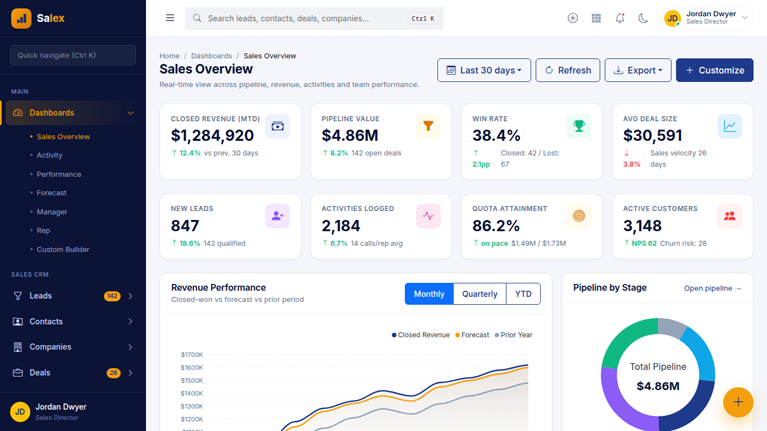
Salex – Premium CRM & Sales Admin Dashboard Template

HTML5 CSS3 JavaScript Bootstrap
Need Help ?
Salex – Premium CRM & Sales Admin Dashboard Template - Premium Template

Salex is a complete, production-ready CRM and Sales admin dashboard template designed for high-velocity sales teams, SaaS founders, and enterprise revenue operations. Built with clean HTML5, Bootstrap 5, and ApexCharts, Salex delivers more than 200 ready-to-customize pages across every module a modern CRM needs – from pipeline management and forecasting to AI-powered lead scoring and customer success tracking.

Clear Documentation

Premium Support

Regular Updates

Need Help? We're Here For You

Our dedicated support team is available 24/7 to help you with any questions or issues. Get in touch with us anytime.

24/7

Availability

Fast Response

Time

Expert

Assistance

Flexible pricing plans tailored for your business

Discover our range of professionally designed templates.

100% Moneyback Guarantee
Secure Checkout · Instant Download · Risk Free

Single Use

For a single end product, with no user fees.

$24
Purchase Now
  • Full source code
  • Documentation
  • Use in SaaS app
  • Projects 1

Multiple Use

For a single end product, with no user fees.

$49
Purchase Now
  • Full source code
  • Documentation
  • Use in SaaS app
  • Projects 3

Extended Use

For a single end product, with no user fees.

$199
Purchase Now
  • Full source code
  • Documentation
  • Use in SaaS app
  • Projects Unlimited

For Business

For multiple end products with user charges.

$299
Purchase Now
  • Full source code
  • Documentation
  • Use in SaaS app
  • Projects Unlimited

Description

13 / 100 SEO Score

Salex is a complete, production-ready CRM and Sales admin dashboard template designed for high-velocity sales teams, SaaS founders, and enterprise revenue operations. Built with clean HTML5, Bootstrap 5, and ApexCharts, Salex delivers more than 200 ready-to-customize pages across every module a modern CRM needs – from pipeline management and forecasting to AI-powered lead scoring and customer success tracking.

The Navy and Gold color palette gives Salex an enterprise-grade premium look that signals trust, depth, and professionalism. Whether you are building a sellable ThemeForest product, a white-label SaaS, or an internal sales tool, Salex provides the structure, components, and data-rich layouts you need to ship fast.

Why Choose Salex CRM Admin Template

Salex was crafted from the ground up for data-dense CRM workflows. Unlike generic admin templates that bolt on a few CRM views, Salex covers every page a real sales team uses every day – and the buttons, modals, dropdowns, search inputs, kanban drag-and-drop, charts, and forms all work out of the box.

The template is purely HTML, CSS, and vanilla JavaScript. No build step. No framework lock-in. Open any page in your browser and it just works. Drop the assets into any backend – Laravel, Django, Node.js, NestJS, Go, Ruby on Rails, ASP.NET, PHP, or WordPress – and start wiring up your data.

Key Features

200+ Hand-Crafted Pages

Salex ships with over two hundred pre-designed pages organized into logical CRM modules. Every page uses real-looking sample data, working interactions, and properly styled components – not Lorem Ipsum filler. Pages include 7 dashboards (Sales Overview, Activity, Performance, Forecast, Manager, Rep, and Custom Builder), 11 authentication screens, 16 leads pages, 10 contacts pages, 9 companies pages, 12 deals pages, 10 quotes and proposals pages, dozens of activity, calendar, email, sequences, calls, marketing, pipeline, forecasting, reports, goals, workflow, documents, tickets, products, and customer pages.

Modern Sales CRM Modules

  • Lead management with scoring rules, capture forms, web-to-lead, duplicate manager, and lead conversion
  • Contact 360 view with activity timeline, deals, emails, calls, files, and tags
  • Company and account management with parent-child hierarchy, health scores, and key account plans
  • Multi-pipeline deal management with kanban drag-and-drop, list view, and calendar view
  • Quote builder with line items, discounts, e-signature, and proposal library
  • Activity tracking for calls, emails, meetings, tasks, and notes
  • Sales sequences with multi-step cadences, A/B testing, and step performance
  • Power dialer, call recordings, dispositions, and call analytics
  • Email inbox sync, templates, scheduling, tracking, and bounce reports
  • Calendar sync, booking page, round-robin scheduling, and meeting types
  • Marketing campaigns, landing pages, drip flows, A/B tests, and UTM manager
  • Forecasting with commit, best case, and pipeline buckets plus quota tracking
  • Reports and analytics with conversion funnel, win/loss analysis, and custom report builder
  • Goals, quotas, commission calculator, leaderboard, and achievement badges
  • Workflow automation builder with triggers, conditions, and actions
  • Document templates, e-signature requests, document tracking, and file library
  • Ticketing and support with SLA rules, knowledge base, and CSAT surveys
  • Products, pricing, bundles, subscription products, and discount schemes
  • Customer success tracking with health scores, churn risk, renewals, and onboarding

Built-In Dark Mode

Salex includes a fully designed dark mode with a single-click toggle in the topbar. The user choice is persisted in local storage, so the preferred theme follows the user across pages and reloads. Every component, table, form, dropdown, modal, kanban card, timeline item, and chart palette has been hand-tuned for both light and dark backgrounds.

Premium Charts and Data Visualization

Salex uses ApexCharts for all charts – area charts, bar charts, donut charts, radial gauges, scatter plots, funnels, radar charts, sparklines, and heatmaps. Reusable chart factory functions in the JavaScript layer mean you can spin up new visualizations in two lines.

Real Working Interactions

Every button, dropdown, modal, form, search input, sidebar toggle, theme switcher, kanban card, copy-to-clipboard control, confirm prompt, and toast notification is wired up. Demo forms intercept submission and show success toasts. Drag-and-drop pipeline cards move between stages. The sidebar collapses on desktop and slides over on mobile. The user choice is remembered.

Clean, Self-Contained Assets

The template uses three CSS files (theme, layout, components) and three JavaScript files (app, charts, data) plus an optional pages.js for page-specific initializers. No build pipeline, no Node modules to install, no SCSS to compile. The whole template is three folders and a few CDN script tags.

Tech Stack

  • HTML5 with semantic markup
  • Bootstrap 5.3.3 for the grid, utilities, and core components
  • Bootstrap Icons 1.11.3 for over 1,800 icons
  • ApexCharts 3.49.1 for all charts and graphs
  • Inter font family from Google Fonts
  • Vanilla JavaScript – no jQuery, no frameworks
  • CSS custom properties for theming and dark mode

Color Palette

Salex uses a Navy and Gold enterprise color palette. The primary color is a deep navy blue (#1E3A8A) and the accent color is a warm gold (#F59E0B). This combination signals premium quality, seriousness, and trust – perfect for B2B SaaS, financial CRM, real estate sales platforms, and enterprise software.

Who Is Salex For

  • SaaS founders building a custom CRM or sales platform
  • Agencies delivering white-label CRM solutions to clients
  • Sales operations teams replacing spreadsheets and patchwork tools
  • Developers shipping ThemeForest or Wrappixel-style admin templates
  • Real estate agencies building bespoke listing and lead pipelines
  • Recruiting firms tracking candidates through hiring stages
  • Insurance brokerages tracking quotes and policy renewals
  • Consulting firms managing client engagements and proposals
  • Channel and reseller partners building partner portals
  • Anyone replacing Salesforce, HubSpot, or Pipedrive with a custom solution

Authentication and Security Pages

Salex includes a complete suite of authentication pages with split-screen layouts featuring testimonials and product highlights on one side and clean forms on the other. The auth pages include login, register, forgot password, reset password, two-factor authentication with OTP input, single sign-on with Okta or Azure AD or Google Workspace, magic link, lock screen, invite-only signup, and email verification.

AI-Ready Layouts

Salex includes ready-made views for modern AI sales features that you can wire up to OpenAI, Anthropic Claude, or your own models – lead scoring with feature weights, AI email drafting with goal and tone selection, meeting notes summary with action items, call sentiment analysis with risk flags, next-best-action recommendations, AI forecast insights, AI chat assistant, and data enrichment.

Responsive and Mobile-Friendly

Every page in Salex adapts to mobile, tablet, and desktop viewports. The sidebar collapses to an off-canvas drawer on mobile. Tables become scrollable. Forms stack. Charts resize. Cards reflow into single columns. Touch targets are sized appropriately. The template has been tested on Chrome, Firefox, Safari, and Edge.

Print-Ready

Quote, proposal, and invoice detail pages include print-specific styles that hide the sidebar, topbar, and floating action button so users can print clean PDFs directly from the browser.


Why Developers Choose Us

Our templates include everything you need to create modern, scalable websites with ease.

Responsive Design

Every template is fully responsive and looks stunning on all devices - from mobile to desktop.

Lightning Fast

Optimized for performance with minimal CSS and no dependencies. Your site will load in milliseconds.

Easy Customization

Easily customize layouts, colors, typography, and components to match your brand identity.

Clean Code

Well-organized, commented code that's easy to understand and modify for your needs.

Regular Updates

Get free lifetime updates with new features, improvements, and security patches.

Premium Support

Get help when you need it with our dedicated support team available 24/7.

Frequently Asked Questions

Find answers to the most common questions about orders, shipping, returns, and more.

Still have a question?

We're here to help! Reach out to our support team and we'll get back to you as soon as possible.

What is an admin dashboard template and how is it used in web applications?
An admin dashboard template is the control room of a web application. Every serious product has one. It is where administrators manage users, teams monitor activity, and product managers watch performance numbers move in real time. Instead of designing and building this interface from scratch, developers start with a template that already contains the structural UI layer required for operations. Inside it live dashboards, reporting panels, tables that hold thousands of records, configuration pages, and system controls. Engineers connect their backend services to this interface and immediately gain a working operational console. That shortcut removes a large portion of repetitive interface development that most web applications eventually require.
Which frameworks do modern admin dashboard templates usually support?
Admin dashboards rarely exist in isolation. They must fit directly into the development stack already running the product. For that reason most modern dashboard templates support several popular front-end frameworks. React appears most often because its component system fits data-heavy interfaces extremely well. Next.js commonly follows when teams want server rendering and efficient routing. Angular remains common inside enterprise environments where applications grow large and structured. Vue attracts teams who prefer lightweight reactive frameworks. Bootstrap dashboards remain useful for rapid interface deployment, while Tailwind dashboards provide extremely flexible styling systems. Supporting these frameworks allows teams to integrate dashboards into existing projects without reworking their entire codebase.
What features should a high-quality admin dashboard template include?
A capable admin dashboard template operates like the operating system of the application’s internal environment. It brings together multiple UI elements that administrators rely on constantly. Analytics dashboards visualize performance data through charts and graphs. Large data tables allow teams to browse and manage records such as users, transactions, or inventory items. Forms enable structured workflows like product creation or account management. Authentication pages handle system access. Notification panels show system events. Reporting modules summarize trends. Navigation systems tie everything together so users can move quickly between operational areas. When those components already exist, development teams skip weeks of repetitive interface work.
How much development time can an admin dashboard template save?
Admin dashboard templates compress the entire development phase dramatically. The UI infrastructure already exists. Developers move straight into connecting APIs, integrating databases, and wiring business logic into the interface. A dashboard template removes weeks of front-end engineering work and allows product features to reach production much faster.
Are admin dashboard templates suitable for large SaaS platforms?
Yes, and many SaaS products actually begin that way. The administrative needs of SaaS platforms tend to follow familiar patterns. Teams need user management panels, analytics views, subscription data, reporting tools, configuration pages, and system monitoring dashboards. A strong dashboard template already contains the UI structure required for these operations. Developers then extend it by adding application-specific data layers and new modules as the product evolves. Startups benefit because they launch quickly with a polished operational interface. In short, admin dashboard templates are very well suited for large SaaS platforms.
Can developers customize admin dashboard templates easily?
Yes of course! In fact, customization is a major reason teams choose dashboard templates in the first place. No two applications display identical data or follow identical workflows. Therefore, developers usually use dashboards extensively once the template enters a project. This makes sure that entire modules such as billing systems, order management panels, or customer support tools often get introduced. Templates are useful because they can change the branding easily. Because dashboard templates rely on reusable UI components, developers extend the interface gradually without rewriting the foundation.
Which types of applications commonly use admin dashboard templates?
Admin dashboards appear almost everywhere modern software operates. SaaS platforms depend on them to manage users and monitor product performance. Ecommerce companies operate inventory systems, orders, and sales metrics through dashboards. CRM tools use dashboard panels to organize the customer records and communication history. Even analytics platforms use them to visulaize reporting data.  Some enterprise tools depend on dashboards to track operations and system activity. Some marketplaces and fintech applications also depend heavily on administrative interfaces.

Explore Top Selling Admin Templates

Discover our most popular modern, responsive, and developer-friendly admin dashboard templates.

News & Articles

Discover our most popular modern, responsive, and developer-friendly admin dashboard templates.

Subscribe to our newsletter

From strategy to execution, we help you create powerful digital experiences that drive real results.

Stay Updated No spam, unsubscribe anytime.