


 Purchase Now
 Live Preview







 Purchase Now

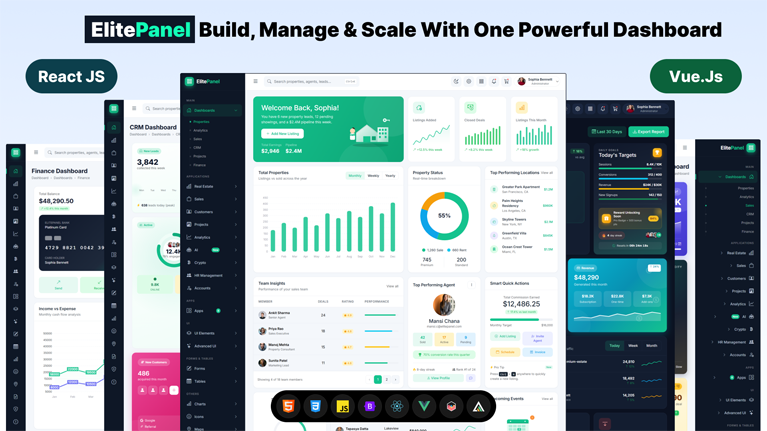
ElitePanel is a premium, fully responsive, multipurpose admin dashboard template purpose-built for thirteen industries — Real Estate, SaaS, CRM, HR, Finance, Banking, Crypto trading, eCommerce, Project Management, Analytics, AI-powered SaaS, Helpdesk, and Customer support. Shipped in three production-ready codebases — pure Bootstrap 5.3.8 HTML, React 19 with Vite 8 and React Router 7, and Vue 3.5 with Vite 8 and Vue Router 5 — ElitePanel delivers 144 hand-coded pages, 13 unique dashboard variants, and over 200 reusable UI components, every screen designed to be production-ready out of the box. Pick the stack your team already speaks; the design system is pixel-identical across all three builds.
Three Framework Builds, One Design System
ElitePanel ships as three independent yet visually identical codebases. The Bootstrap 5.3.8 HTML build requires zero build step — drop the html/ folder onto any web server and go live. The React 19 build is powered by Vite 8, React Router 7, and code-splitting via lazy components for fast first paint and on-demand route loading. The Vue 3.5 build uses Vite 8 and Vue Router 5 with the Composition API throughout. Every dashboard, app, form, table, chart, and layout mode is mirrored across all three so you can buy once and deploy on whichever stack your engineering team prefers — or hand the same designs to three different teams without re-implementation.
Template Highlights
Every page in the Bootstrap HTML build is W3C valid, semantically structured, and SEO friendly. The template uses Bootstrap 5.3.8, Bootstrap Icons 1.13, ApexCharts 5.13, ChartJS, Morris, Flot, Sparkline, Quill 2.0 rich-text editor, Flatpickr 4.6 date pickers, Choices.js 11.2 select widgets, SweetAlert2 11.26 popups, Datamaps vector world maps, Leaflet 1.9 for interactive maps, and a full vanilla-JS layer that requires zero framework dependencies. The React and Vue builds wrap the same vendor libraries via npm packages with first-class component bindings. The codebase is organised into 27 focused CSS files and 21 modular JavaScript files so customisation stays simple even for large teams.
Layout Modes & Theme System
ElitePanel includes a complete Template Settings panel that lets end users switch between Light Mode and Dark Mode, choose Boxed Layout, Compact (Mini) Sidebar, Horizontal Top Menu, or RTL Right-to-Left direction — all toggles persist to localStorage and apply instantly without a page reload. Every component, chart, table, form, and card has been individually tuned for both light and dark themes, including Bootstrap accordion variables, soft-coloured badges, gradient hero cards, and the entire range of vendor widgets. The same settings panel is available across the Bootstrap HTML, React, and Vue builds.
Industries Covered
ElitePanel is a true multipurpose admin template — one design system delivering specialised dashboards for thirteen sectors. The Real Estate module covers property listings, agents directory, leads pipeline, and sold-properties tracking. The SaaS module provides subscription analytics, MRR / ARR forecasting, and churn dashboards. The CRM module includes customer pipelines, lead scoring, and helpdesk tickets. The HR module handles employees, attendance, payroll, leaves, and announcements. The Finance and Banking modules surface transactions, expenses, savings goals, and a full banking-style cash management interface. The Crypto module includes market overview, coin detail, spot trading with order book, assets, and KYC. The eCommerce module powers product catalogs, order lists, and invoice generation. The Projects module ships Kanban, Scrumboard, Gantt-style timelines, and team workload. The Analytics module drives forecast curves, revenue stacks, and subscription funnels. The AI module provides Chat assistant, Image generator, and Writer interfaces. Helpdesk and Customer Support round out the suite.
Real Estate Dashboard Features
The Properties dashboard, Property List, Property Grid, Property Detail, Add Property, Agents List, and Agent Profile pages provide a complete real estate management workflow. Built-in widgets include property listings with favourite toggles, top-performing agents tables, top performing locations, recent purchase tracking, sold-properties timelines, upcoming events calendar, smart quick actions, and live ApexCharts sparklines for listings added and closed deals.
Sales, CRM & Customer Management
Sales Dashboard, Product List, Product Details, New Product, Order List, New Order, and Edit Order pages handle the full eCommerce flow. The CRM section covers Customers Dashboard, Customers List, Customer Details, Leads, Lead Details, and Helpdesk tickets — every screen shipped with realistic mock data, dropdown filters, search bars, sort controls, and responsive Bootstrap tables that collapse beautifully on mobile devices.
Project Management & Analytics
The Projects section includes Projects Dashboard, Projects List, Project Details, Scrumboard, Timeline, Tasks, and Settings views — all driven by Kanban-style drag-and-drop, Gantt-style timelines, and team workload progress bars. The Analytics dashboard uses ApexCharts 5.13 for forecast curves, revenue stacks, subscription funnels, and monthly reports with drill-down capability.
HR, Finance, Accounts & Crypto Modules
The HR module ships with Employees directory, Attendance tracker, Payroll grid, Leaves request flow, and Announcements feed. The Finance dashboard surfaces Recent Transactions, expense categories, savings goals, and upcoming bills. The Accounts module covers a full Banking-style dashboard with currency exchange board, cash stacks visualization, linked bank accounts, recent transactions table, referrals tracker, pricing plans, invoice generator, and team users management. The Crypto module includes Market overview, Coin detail page, Spot trading interface with order book, Assets holdings, and KYC verification flow.
App Pages & UI Components
Productivity apps include Chat, Email, Calendar, To-Do, Kanban, File Manager, Contacts, and Invoice list/create/view. The AI section provides Chat assistant, Image generator, and Writer interfaces. UI element pages cover Alerts, Buttons, Badges, Cards, Modals, Tabs, Typography, Accordion, Carousel, Dropdowns, List Group, Pagination, Popovers, Progress, Spinners, Toasts, Tooltips, Images, Videos, Grid, Offcanvas, Placeholders, Collapse, Breadcrumbs, and Navbars. Advanced UI pages include Sweet Alerts, Toastr, Rating, Scrollbar, Tree View, Lightbox, Animations, and Ratings Pro.
Forms, Tables, Charts, Icons & Maps
Forms section covers Basic, Advanced, Validation, Wizard, Text Editor (Quill 2.0), File Upload, Pickers (Flatpickr 4.6), Input Mask, Select (Choices.js 11.2), and Layouts. Tables section includes Basic, Data Tables (DataTables.js), Responsive, Editable inline, and Filterable. Charts section demonstrates ApexCharts 5.13, ChartJS, Morris, Flot, and Sparkline. Icons section showcases Bootstrap Icons 1.13, Feather, Tabler, FontAwesome, and Remix icon libraries. Maps section integrates Google Maps, Leaflet 1.9 OpenStreetMap, and Datamaps Vector world map with country drill-down.
Pages, Authentication & Errors
Marketing and utility pages include Profile, Settings, Pricing, FAQ, Timeline, and Blank starter. Authentication flows: Login, Register, Forgot Password, Lock Screen, Confirm Email. Error pages: 404 Not Found, 500 Server Error, Coming Soon, Maintenance — each fully styled with their own creative illustrations and dark-mode support.
Developer Friendly
ElitePanel uses semantic HTML5, ARIA accessibility attributes, valid markup that passes W3C Nu HTML Checker with zero errors, and CSS custom properties for effortless theming. The Bootstrap HTML build needs no build step — drop the html/ folder onto any web server and you are live. The React 19 + Vite 8 and Vue 3.5 + Vite 8 builds include npm scripts (`dev`, `build`, `preview`) plus prepared `dist/` outputs with SPA-friendly .htaccess rewrites so deep links survive a page refresh. All 248 product images live locally in assets/images/unsplash/ so the template works fully offline.
What’s in the Pack
One purchase delivers three production-ready builds: html/ (Bootstrap 5.3.8 + vanilla JS), react/ (React 19 + Vite 8 + React Router 7 + lazy-loaded routes), and vue/ (Vue 3.5 + Vite 8 + Vue Router 5 + Composition API). 144 pages / routes per build. 13 industry dashboards. 200+ UI components. 9 productivity apps. 5 chart libraries pre-wired. 5 icon packs (Bootstrap Icons, Feather, Tabler, FontAwesome, Remix). 5 layout modes (Default, Boxed, Compact Sidebar, Horizontal Menu, RTL). Light + dark mode on every page. 5 authentication variants. 4 error / utility variants. Free updates & lifetime support.







 Live Preview