
 Purchase Now
 Live Preview







 Purchase Now

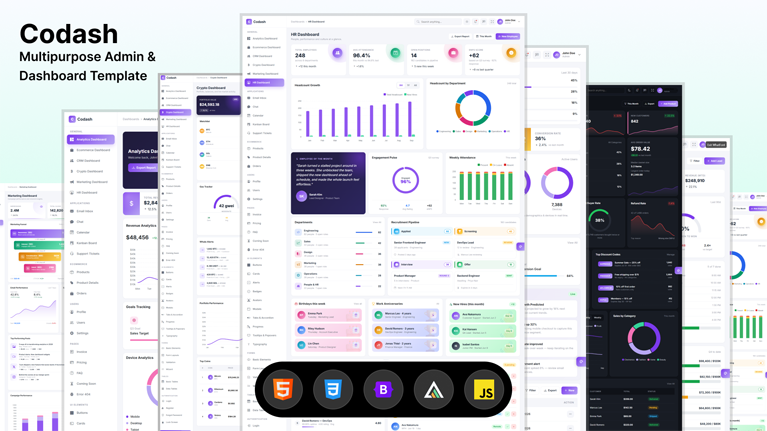
Codash is a modern, fully-responsive admin dashboard template built on Bootstrap 5 and crafted for product teams who want to ship faster without sacrificing design quality. With 42+ production-ready pages, 6 unique dashboards, dark mode out of the box, 7 switchable color themes, ApexCharts visualizations, an accurate vector world map, and over 200 reusable components, Codash is the most comprehensive admin template you can use to launch a SaaS application, an internal tool, an analytics product, an ecommerce backend, or a CRM in a fraction of the time.
Complete Admin Dashboard Template for SaaS, Ecommerce, CRM, Crypto, Marketing & HR
Codash includes six visually distinct admin dashboard layouts so you do not have to settle for a single look-and-feel. Every dashboard has its own signature stat card style, its own content patterns, and its own visualization mix, which means you can drop the template into any vertical and feel right at home. The included dashboards are Analytics Dashboard, Ecommerce Dashboard, CRM Dashboard, Crypto Dashboard, Marketing Dashboard, and HR Dashboard. Each is hand-coded with semantic HTML, accessible color contrast in both light and dark mode, and a consistent design system, so you can mix and match patterns across your own product without breaking visual cohesion.
42+ Production-Ready Admin Template Pages
Codash ships with the complete set of pages a modern admin product needs. You get six dashboards, twelve application pages (Email Inbox, Chat, Calendar, Kanban Board, Support Tickets, Products, Product Details, Orders, Profile, Settings, Users, Data Tables), four authentication flows (Login, Register, Forgot Password, Lock Screen), error pages (404, Coming Soon), full UI element showcases (Buttons, Cards, Alerts, Badges, Avatars, Modals, Tabs, Progress, Tooltips, Typography), forms pages (Basic Elements, Form Layouts, Validation, Multi-Step Wizard), table pages (Basic Tables, Data Tables with sorting and pagination), an Invoice page, a Pricing page, a FAQ page, and even a beautifully designed landing page. Every page is fully wired with working interactions and ready for production.
7 Beautiful Color Themes with One-Click Switching
Codash includes seven carefully crafted color themes that users can switch in real time without any page reload. The themes are Lavender Purple, Ocean Blue, Lime Fresh, Sunset Orange, Aqua Cyan, Mint Green, and Dusty Pink. All themes are powered by CSS custom properties, which means charts, buttons, badges, gradients, and every interactive element re-paints instantly when the theme changes. The selected theme is persisted to localStorage so users return to their preferred look on every visit.
Full Dark Mode Support Across Every Page
Every single page, table, dropdown, modal, popover, chart, and form input in Codash is fully dark-mode aware. Dark mode is implemented via CSS custom property overrides rather than duplicated stylesheets, so the size of the CSS bundle stays compact. Users toggle dark mode from a sun and moon icon in the top bar or from the theme settings panel. ApexCharts and the world map automatically re-render with dark-mode appropriate tooltip themes and stroke colors.
20+ Interactive Charts Powered by ApexCharts
Codash ships with more than twenty pre-configured charts including area charts, bar charts, donut charts, radial bars, gauges, sparklines, stacked bars, and multi-series line charts. Every chart automatically reads the active theme color from CSS variables, so when users switch themes the charts switch with them. The chart factory is centralized in a single charts.js file with a simple build helper that guards against missing DOM elements, so charts only render where they are needed.
Accurate Vector World Map for Geographic Analytics
The Geographic Analytics widget on the Analytics Dashboard uses jsVectorMap to render an accurate vector world map with more than 200 country geometries. Highlighted markets are colored using a polynomial scale derived from the active theme, hover states pull from the secondary color, and dark mode automatically swaps the default fill. Country data can be customized with one line of code.
Fully Responsive Mobile-First Design
Codash is built mobile first with breakpoints at 360px, 575px, 767px, 991px, and 1199px. The sidebar collapses into a slide-in drawer on tablets and phones, the top bar search becomes a full-screen overlay, dashboards reflow gracefully into single-column layouts, and even the world map and charts re-size responsively. The mobile experience is just as polished as the desktop one.
200+ Reusable Components and UI Elements
The component library covers every pattern you need to build a real product. Buttons come in primary, outline, soft pastel, gradient, social brand (Google, GitHub, Slack, Discord, Spotify and more), pill, and floating action variants. Badges include soft, solid, outline, gradient, animated pulse, notification dot, and tag input chip styles. Cards range from compact stat cards to image-cover blog cards, achievement cards, testimonial cards, event cards, news cards, and product cards. There are five completely unique dashboard stat card designs, four unique authentication layouts, six unique pricing card variants, and dozens of list and feed patterns.
Functional Forms, Tables, and Wizards
Forms in Codash are not just static mockups. The multi-step Form Wizard actually steps through stages with progress indicators. Form validation uses HTML5 plus Bootstrap was-validated styling for live valid and invalid feedback on every field. The Data Table page includes client-side search, click-to-sort column headers, auto-generated pagination, and a row counter. The quantity stepper, alert close buttons, toast notifications, modal dialogs, accordions, tabs, tooltips, and popovers are all wired up and working.
Premium Authentication Pages
Codash includes four authentication pages, each with a completely unique premium design so you can pick the one that best matches your brand. The Login page uses an animated mesh gradient art panel with floating blurred blobs and a glass testimonial card. The Register page uses a floating hero card on a dark backdrop with benefits checklist and social proof stats. The Forgot Password page uses a glassmorphism centered card with a 3-step reset indicator on a colorful blurred backdrop. The Lock Screen uses a dark spotlight design with a live updating clock, pulsing avatar halo, and gradient unlock button.
Premium HR Dashboard with Halo Stat Cards
The HR Dashboard introduces a sixth completely unique stat card design called Halo Cards. Each stat card features a floating circular medallion icon in the top-right corner with a subtle ring halo, pastel-tinted background, and color-coded per metric. The HR Dashboard also includes a recruitment pipeline with four stage columns (Applied, Screening, Interview, Offer), gradient celebration cards for birthdays and work anniversaries, a leave-approval queue with one-click approve and reject buttons, a top-performer leaderboard with gold-silver-bronze medals, an Employee of the Month spotlight quote card, and department headcount breakdown bars.
Easy to Customize, Easy to Brand
Codash is built with separation of concerns in mind. All colors live in CSS custom properties at the top of a single stylesheet, so re-branding the entire template is as simple as changing a handful of variables. The layout, sidebar, top bar, and footer are injected by a small layout.js script so updating navigation across all 42 pages is a one-line change. Settings live in a CodashSettings global, charts in CodashCharts, and the world map in CodashWorldMap, so the JavaScript API is predictable and easy to extend.
Built on Modern Web Standards
Codash uses Bootstrap 5.3, Bootstrap Icons 1.11, jQuery 3.7, ApexCharts 3.49, jsVectorMap 1.6, and Google Fonts (Inter). All assets are loaded from jsDelivr CDN with locked versions for production safety. The HTML is semantic, the markup is clean, and the code is commented where intent is not obvious. There are no inline styles or inline scripts in the HTML pages so it is trivial to extract patterns into your own component library.







 Live Preview