
 Purchase Now
 Live Preview







 Purchase Now

11 Ready-Made Pages Included
Every page in this template has been carefully crafted with unique content, colorful hero sections, and consistent navigation. As a result, you get a complete website experience right out of the box. Here is a breakdown of each page and what it offers.
1. Homepage (index.html)
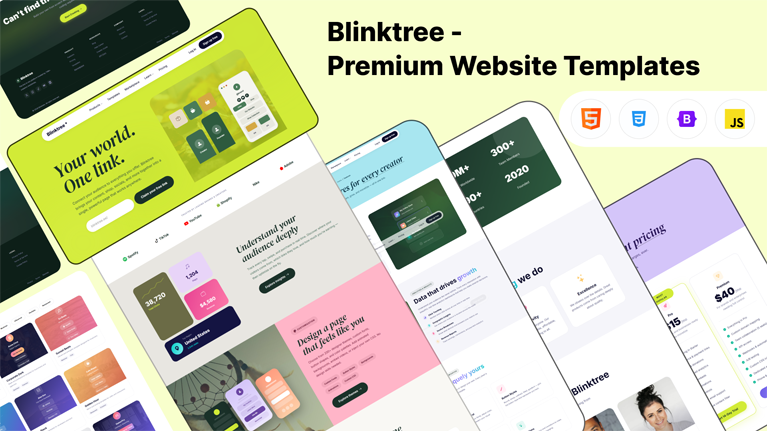
The homepage makes a powerful first impression. It features a bold italic serif heading on a vibrant lime-green hero section, paired with an interactive signup form. Visitors immediately see the brand showcase with floating phone mockups, product icons, and creator figures. Below the hero, you will find sections for trusted brand logos, an analytics dashboard visual, customization previews, a commerce showcase, how-it-works steps, animated stats, testimonials, pricing cards, and a strong call-to-action block. In short, this page covers everything a landing page needs to convert visitors into users.
2. Features Page (features.html)
This page dives deep into the platform’s capabilities. It walks visitors through link management tools, analytics dashboards, customization options, commerce features, and social integrations. Each feature block uses a two-column layout with colorful visuals on one side and persuasive copy on the other. Moreover, the commerce section includes a dark-themed product mockup, while the integrations section displays popular platform icons like YouTube, Spotify, TikTok, and Stripe.
3. Pricing Page (pricing.html)
The pricing page is one of the richest pages in the template. It starts with four pricing cards that support a monthly and annual toggle switch. Following the cards, you will find a full feature comparison table that highlights the most popular plan. After that, three colorful feature showcase sections explain the value of upgrading. Next comes an enterprise section with a dark green background and a feature checklist. The page also includes creator testimonials on a warm peach background, trust signal stats, and an extensive FAQ accordion. Consequently, this page addresses every question a potential customer might have before purchasing.
4. Templates Page (templates.html)
Visitors can browse nine beautifully designed template preview cards on this page. Each card displays a gradient background with a subtle image overlay, a mini link-page preview, and category tags. A filter bar at the top lets users sort templates by category, including Creator, Business, Musician, Influencer, Portfolio, and Restaurant. The filter buttons use smooth animations, so switching between categories feels snappy and polished.
5. Marketplace Page (marketplace.html)
The marketplace page showcases nine app and integration cards. Each card displays an app icon, description, star rating, and install count. A featured integration banner spans the full width at the top, highlighting a key partnership. Users can filter apps by category using the top filter bar. As a result, this page works perfectly for showcasing plugins, add-ons, or third-party integrations.
6. About Page (about.html)
The about page tells the company story with a mission statement, stat highlights, and a timeline of milestones. It also features four team member cards with high-resolution portrait photos from Unsplash, job titles, and social media links. A values section presents four core principles with colorful icon cards. Furthermore, the timeline section uses a dark green background with gradient year labels, creating a visually striking journey through the company’s history.
7. Blog Page (blog.html)
Content marketing is essential, and this blog page delivers a premium reading experience. It starts with a featured article banner that spans the full width. Below that, six blog post cards display real images, colored category badges, titles, excerpts, and author metadata. A pagination component sits at the bottom, followed by a newsletter subscription section. Therefore, this page is ready for any content strategy.
8. Contact Page (contact.html)
The contact page includes three info cards for email, live chat, and office location. A detailed contact form sits on the left side with fields for name, email, subject dropdown, and message. On the right side, a dark green panel holds an inline FAQ accordion and social media links. This layout ensures visitors can reach out through their preferred method without any friction.
9. Login Page (login.html)
The login page follows the same structure as every other page. It uses the shared navigation bar with mega menus and a lime-green hero header. The centered form card includes Google and Apple social login buttons, email and password fields, a remember-me checkbox, and a prominent submit button. A call-to-action section below encourages new visitors to sign up.
10. Sign Up Page (signup.html)
Similarly, the sign-up page uses the shared layout. Its mint-green hero header welcomes new users. The form includes first name, last name, email, a username picker with a custom prefix, password field with toggle visibility, and a terms checkbox. Below the form, a lime-green section highlights four reasons to join. This approach gives new users confidence before they commit.
11. Profile Page (profile.html)
This is the actual link-in-bio page that end users would share. It features a gradient background, a profile avatar, verified badge, bio text, and multiple styled link buttons. A Spotify embed mockup adds a music preview element. Social media icons line the bottom, and a subtle Blinktree branding badge links back to the main site. As a result, this page serves as a fully functional demo of the final product.
Design and Visual Features
Blinktree stands apart from other templates through its bold use of color. Every inner page uses a different hero background color. The homepage uses lime green, features uses sky blue, templates uses rose pink, marketplace uses peach, pricing uses lavender, blog uses butter yellow, about uses mint green, contact uses coral, login uses lime, and signup uses mint. This variety creates a vibrant, memorable browsing experience.
In addition, the template uses the DM Serif Display font for headings, giving them an elegant italic serif style. Body text uses Inter, a clean and modern sans-serif typeface. Together, these fonts create a strong visual hierarchy that guides the reader’s eye naturally through each section.
Smooth scroll-reveal animations trigger as users scroll down the page. Counters animate from zero to their target values when they enter the viewport. Buttons feature a shimmer hover effect, and cards lift with subtle shadows on hover. These micro-interactions make the template feel polished and alive without overwhelming the user.
Navigation and Mega Menu
The navigation bar uses a pill-shaped white container that floats over the hero section. It includes the Blinktree brand name with an asterisk, five main menu items, and login and signup buttons. Two of the menu items — Products and Learn — trigger rich mega dropdown menus on hover.
The Products mega menu contains six link items organized into two columns, plus a featured card with a dark green gradient background. The Learn mega menu includes resources, company links, and support options. On mobile devices, these mega menus collapse into toggleable sections within the hamburger menu. Consequently, the navigation works smoothly across all screen sizes.
Technical Specifications
This template is built entirely with HTML5, CSS3, Bootstrap 5.3, Bootstrap Icons, and vanilla JavaScript. It does not require any build tools, Node.js, or package managers. You simply drop the files into your server and start customizing. This simplicity makes it accessible to beginners and experienced developers alike.
Technology Stack
- HTML5 — Semantic markup for accessibility and SEO
- CSS3 — Custom properties, gradients, animations, and grid layouts
- Bootstrap 5.3 — Responsive grid, components, and utilities via CDN
- Bootstrap Icons — 1,800+ icons loaded via CDN
- Vanilla JavaScript — No jQuery dependency, lightweight and fast
- Google Fonts — Inter and DM Serif Display loaded via CDN
Key Technical Features
- Fully responsive design that adapts to mobile, tablet, and desktop screens
- CSS custom properties for easy global theming and color changes
- Scroll-triggered reveal animations using Intersection Observer API
- Animated number counters that activate on scroll
- Monthly and annual pricing toggle with JavaScript
- Template category filter system with smooth transitions
- Password visibility toggle on login and signup forms
- Smooth scrolling for anchor links throughout the site
- Back-to-top button with scroll-based visibility
- Page loading animation with fade-out transition
- SVG favicon that matches the brand identity
- Clean, well-commented CSS organized into logical sections





 Live Preview