
 Purchase Now
 Live Preview







 Purchase Now

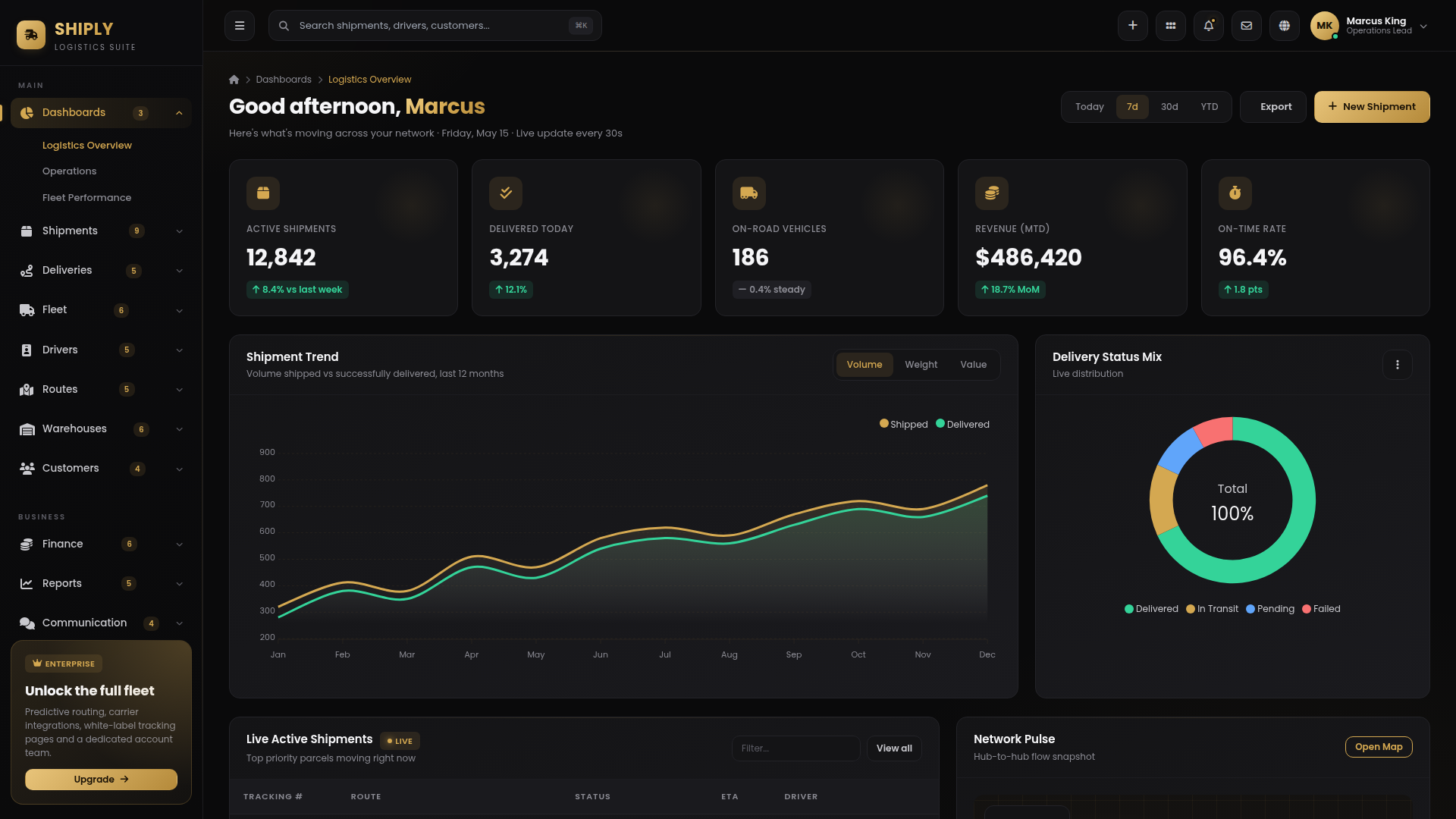
Shiply is a complete, production-ready logistics and delivery management admin dashboard template engineered for courier companies, last-mile carriers, freight operators, 3PL providers, e-commerce fulfilment teams, white-label shipping platforms, dispatch and routing software vendors, and any modern logistics business that treats every parcel as a brand promise. Built as pure HTML with Tailwind CSS via CDN, ApexCharts 3 visualisations, an SVG favicon and a hand-crafted dark-luxury design system, Shiply ships with 79 unique, content-rich pages covering every workflow a real logistics operation performs day in, day out — from live shipment tracking and route optimisation to driver payouts, COD reconciliation, manifest dispatch, proof-of-delivery capture, hub-to-hub network planning, and board-grade revenue reporting.
Stop stitching together three different open-source dashboards to build your logistics product. Shiply arrives finished. Drop in your data, wire your backend, swap the company logo, and you are ready to onboard paying customers. Every screen is densely written, beautifully laid out, and reflects how a real courier and fleet operation actually runs in 2026 — not a thin wrapper of placeholders pretending to be an admin template.
Why Shiply is different
Most admin templates ship with eight demo pages and a thousand placeholders. Shiply ships with seventy-nine fully designed screens, each tied to a real logistics workflow. The visual language is intentionally premium — a deep onyx black canvas paired with a rich royal-gold accent (#D4A851), gentle radial gold backdrops, gold-edged border glows, and the Poppins display face used consistently across body and headings. The result is a wealth-of-precision aesthetic that feels appropriate for managing high-value freight, premium next-day couriers, white-glove logistics, and same-day luxury delivery — yet remains equally elegant for SMB courier startups, regional last-mile fleets, and SaaS logistics platforms.
Every dashboard tile, every shipment timeline, every driver scorecard, every route waypoint uses realistic, industry-correct content. Tracking numbers follow conventional courier prefixes. Vehicle registrations look like real plates. SLA windows respect industry standards. Manifests are sealed and signed. Hub utilisation respects capacity ceilings. COD reconciliation is double-entry balanced. This is not a template a front-end developer mocked up in a weekend — it is a logistics product specification rendered as interactive screens.
What is included
3 Dashboards: Main logistics overview with active shipment KPIs, delivery status mix donut, live shipment register, network pulse map, top driver leaderboard and operations timeline; Operations dashboard with orders-per-hour, dispatch rate, hub occupancy, SLA breach risk, real-time alerts panel, hub heatmap and dispatch board; Fleet performance dashboard with fleet distribution donut, utilisation chart, fuel cost stacked bar, maintenance schedule, vehicle leaderboard and depreciation table.
Shipments & Orders module: Shipment list with grid plus table view toggle, status tabs, filter chips, bulk action bar, pagination and ~12 sample shipments; full shipment detail page with tracking hero, two-column layout, timeline, route map preview and tabs for timeline, documents, pricing and notes; rich create-and-edit shipment form with stepper, dimensions, weight, fragile flag, insurance, COD amount, pickup window, service type and price calculator sidebar; live tracking map control-centre with full-canvas map, multiple pins, route polyline, live shipment list, distance and ETA gauges; detailed tracking timeline with planned-versus-actual strip, photos, signatures and geo-coordinates; bulk import workspace with drag-drop upload, CSV mapping table, validation errors and import history; label generation and print queue with barcode preview, label-size selector and 4-up label grid; manifests register with sealing, dispatch, hub-to-hub transfer and driver assignment; returns and RTO workspace with reason distribution, refund summary and inspection tabs.
Deliveries module: Today’s deliveries with status KPI strip, per-driver progress cards, live delivery map, scheduled-versus-actual table and hour-by-hour flow chart; delivery routes view with route cards, completion percentage and mini map per route; failed deliveries with failure-reason donut, retry table and escalation column; proof-of-delivery gallery with photo placeholders, signature illustration and PDF downloads; delivery exceptions with alert banner, SLA risk score, assigned operations user and root-cause distribution.
Fleet Management module: Vehicle list with grid and table toggle, vehicle cards, KPI strip and fuel-level progress bars; vehicle detail page with hero, mileage and uptime KPIs, maintenance timeline, trip log and document grid; add-and-edit vehicle form with live preview card; vehicle assignment workspace with unassigned column and driver-vehicle pairing table; maintenance schedule with calendar view, upcoming service table, parts inventory and vendor list; fuel and expense log with totals, table of fuel entries, fuel-cost stacked bar and top fuel-spending vehicles.
Drivers module: Driver list with KPI strip, filter chips, grid plus table view, driver cards and ratings; driver profile page with hero, tabs and performance radar; driver assignments with today’s roster, shift calendar and route mapping; driver performance dashboard with gold-silver-bronze podium, leaderboard chart and zone heatmap; driver documents with license, insurance, medical and background-check cards, expiry calendar and compliance gauge.
Routes & Planning module: Route list with cards, table view and filters; route planner with three-column layout, full-canvas map, stop list, summary panel and cost calculator; optimize routes with before-and-after savings cards, priority weights and optimisation log; zones and coverage areas with zone cards, coverage map and per-zone performance table; hub and warehouse network with SVG network diagram, hub-to-hub flow table and capacity gauges.
Warehouses & Inventory module: Warehouse list with capacity gauges and manager avatars; warehouse detail with zone map, tabs and equipment list; inventory and stock register with SKU table, reorder alerts panel and stock-level distribution chart; stock transfers with transfer list table and timeline; receiving and dispatch workspace with split inbound and outbound sections, dock schedule and manifest list; pickup requests with status tabs, request table and assigned driver column.
Customers module: Customer list with KPI strip, customer cards, tier badges, lifetime value and filters; customer detail with hero, tabs and shipment history; customer addresses with grid of address cards and default flagging; customer invoices with status tabs, invoices table and invoice preview side panel.
Finance & Billing module: Finance dashboard with revenue KPIs, revenue-versus-expense chart, revenue source donut, recent transactions table and top-paying customers list; invoices register with aging tabs, KPI strip and invoice preview; payments register with method tabs, payments table, payment-method donut and daily settlement summary; pricing and rate cards with service-type tabs, by-weight and by-distance tables and zone matrix; driver payouts with KPI strip, payouts table, payout calendar and top earners chart; COD reconciliation with collection chart, reconciliation table, discrepancy alerts and settlement timeline.
Reports module: Shipment report with filters, KPI strip, volume chart, service breakdown, zone heatmap and origin-to-destination flow; delivery performance with on-time trend, failed-reasons distribution, driver performance table and SLA-by-zone; fleet utilisation with utilisation chart, fleet distribution, per-vehicle table and over- and under-performer cards; driver report with leaderboard, twelve-row driver scorecard and trend chart; revenue report with big revenue trend, service donut, zone bar, top-ten customers and period comparison.
Communication module: Notifications with category tabs, grouped by date, mark-all-read and action buttons; announcements with hero featured card, grid and category filter; support tickets with KPI strip, status tabs, tickets table and side preview conversation thread; internal chat with three-column layout, channels list, message thread with bubble styling, textarea composer and prominent send button.
Account & Settings module: Profile page with hero, tabs and stats; account settings with general, notifications, security, privacy and connected-accounts panels; company settings with profile, branding, operating hours, tax and legal tabs; service areas with zone grid, coverage map and zone editor; roles and permissions with role cards and permissions matrix; API and integrations with courier, payment, CRM and accounting cards, API keys and webhook URLs; SaaS billing with current plan hero, usage progress bars and invoices history.
Auth & Utility: Login, register with strength meter, forgot password, reset password with requirement checklist, OTP and 2FA with six digit boxes, lock screen, branded 404 lost-parcel and 500 maintenance pages. All auth screens use a split-screen luxe layout with brand-side testimonial and gold-gradient typography.
Extras for marketplace value: Pricing page with three tiers and most-popular highlight; FAQ with category sidebar and accordion; starter blank page; UI components showcase with buttons, badges, forms, switches, tabs, pills, modals, progress, timeline, avatars, chips and ratings; form layouts demonstrating basic, two-column, wizard, inline, floating-label, validation and file upload patterns; chart showcase with line, bar, area, donut, radar and radial-bar examples.
Built for developers who ship
Shiply is built as static HTML enhanced with Tailwind CSS Play CDN, vanilla JavaScript, ApexCharts 3 for production-grade dashboards including area, line, bar, donut, radar and radial-bar visualisations, a hand-crafted CSS design-token system that loads after Tailwind so brand components always win the cascade, Font Awesome 6 for consistent iconography, Poppins from Google Fonts, and a single SVG favicon with the brand gold gradient. The codebase organises pages by domain (dashboard, shipments, deliveries, fleet, drivers, routes, warehouses, customers, finance, reports, communication, settings, auth, extras), and every page is self-contained with the same sidebar and topbar pattern. You can mix Tailwind utilities (flex, grid-cols, gap, p, mb, items-center) with the design-system classes (card, card-luxe, stat-card, btn-gold, badge, timeline) on the same element.
Every page is fully responsive from 360px mobile up to 4K desktop. The sidebar collapses to an icon-only rail on desktop with hover-out popout submenus that auto-flip upward near the viewport bottom and clamp to viewport height when the menu is long. The collapsed state persists across page navigations via localStorage. On mobile, the sidebar becomes a slide-over drawer with backdrop blur, smooth slide-in transform, outside-click dismissal and auto-close on submenu navigation. A small gold logo mark appears in the topbar to the left of the menu icon on mobile. KPI strips, two-column layouts and three-column panels collapse to a single column on mobile so every card sits one per row. Tables scroll horizontally on narrow screens. Charts adapt to their container. Dropdowns close on outside click. Tabs, modals, view switchers, table searches and data-status row filters all use data-attribute hooks so the same JavaScript file wires every page.
Status tabs on shipments, deliveries, returns and similar list pages are fully wired — each row and grid card carries a data-status attribute, and clicking any tab live-filters the visible rows so users see only Pending, In Transit, Delivered, Failed or Returned items as required. The same hook (data-tab-filter on the tab list, data-status on items) can be applied to any table in the template to instantly add live tab filtering. Map pages (route planner, hub network, live tracking) connect pins with inline SVG polylines using a viewBox coordinate system that matches the pin percentage positions exactly, so route lines stay accurately anchored to pins regardless of canvas aspect ratio or browser size.
Production-ready logistics features
Shiply is opinionated about what a real logistics product needs. Live shipment tracking with live-pulse map pins. Hub-to-hub network diagrams drawn as SVG so connections line up with coordinates exactly. Route polylines with viewBox 0..100 that match pin percentage positions on any aspect ratio. Bulk shipment import with CSV column mapping and validation feedback. Manifest sealing and dispatch with driver and vehicle assignment. Proof-of-delivery capture with signature, photo and timestamp. Failed delivery and exception workflows with retry, escalation and SLA-risk scoring. COD reconciliation with variance detection. Driver payout cycles with deductions and pay-date calendar. Multi-currency pricing with by-weight and by-distance rate cards. Courier and payment integrations gallery (DHL, FedEx, UPS, Aramex, BlueDart, Stripe, PayPal, Razorpay). Role-based access with owner, admin, operations lead, dispatcher, driver, viewer and finance tiers. Whitelabel branding panel with logo, colour pickers and customer portal preferences. White-glove luxury aesthetic for premium next-day couriers, same-day luxury delivery, cold-chain logistics and high-value freight.
Use cases
Shiply fits any courier company, last-mile delivery startup, regional fleet operator, third-party logistics provider, e-commerce fulfilment back-office, freight broker, white-label shipping SaaS, dispatch software vendor, cold-chain operator, white-glove luxury delivery, premium next-day courier, same-day delivery app back-office, ride-hail driver dashboard, food-delivery operations console, grocery delivery dispatch console, heavy-cargo carrier, container drayage operator, port-to-door freight forwarder, international parcel broker, customs-clearance workflow, or any application needing premium logistics workflows with shipment tracking, fleet management, route planning, hub networks, driver scorecards, billing, reporting and an opinionated black-and-gold luxury aesthetic.
What you save
A custom-built logistics admin to this level of completeness takes 1200 to 2000 hours of logistics domain research, frontend design, integration work and content writing. Starting with Shiply skips six to nine months and delivers a polished, opinionated baseline that customers and stakeholders instantly trust. Focus your engineering on the domain logic that makes your product unique — not on rebuilding the manifest dispatch screen for the hundredth time.







 Live Preview