
 Purchase Now
 Live Preview







 Purchase Now

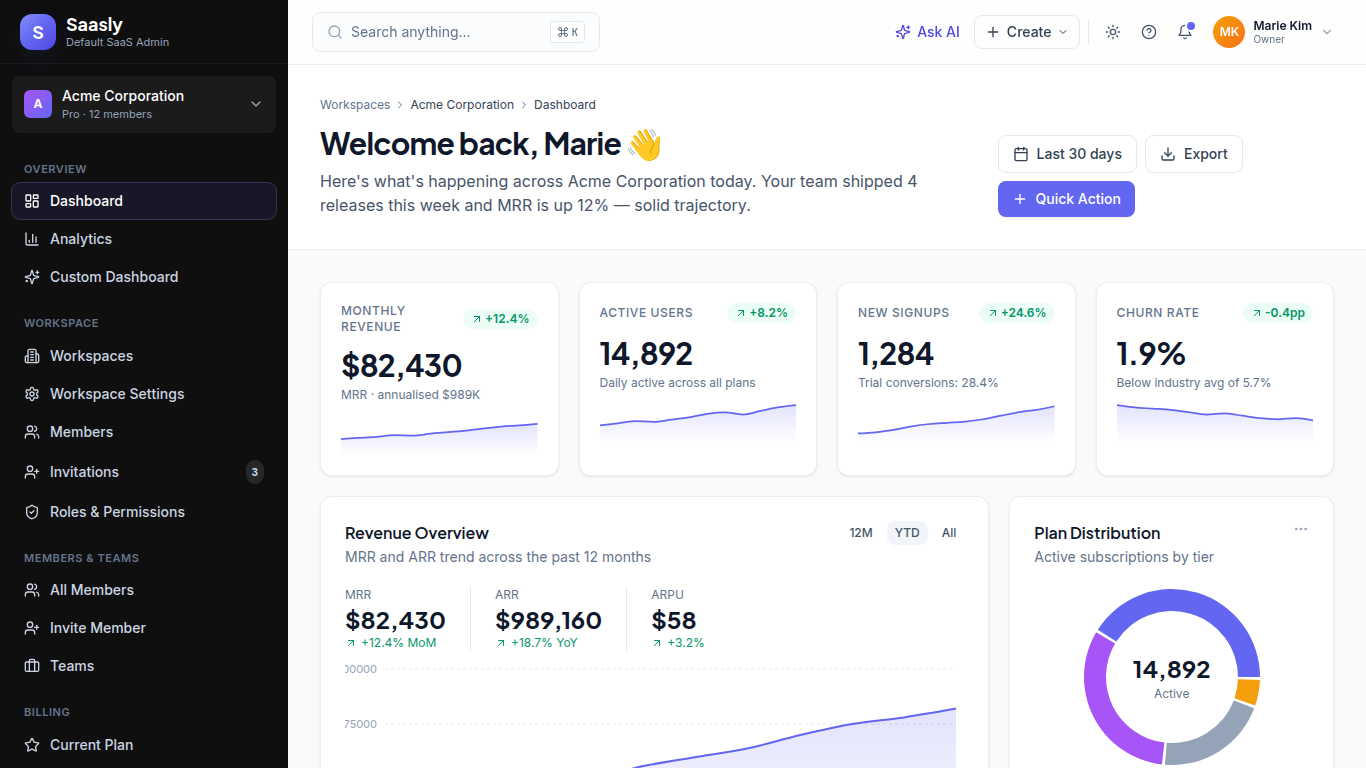
Saasly is a complete, production-ready SaaS admin dashboard template built with React Router 7, TypeScript, Vite and Tailwind CSS. It is engineered to be the “default SaaS look” — instantly recognised by users, friendly to designers, fast for developers and ready to ship for any B2B SaaS, micro-SaaS, internal tool or admin platform you are launching in 2026 and beyond.
Stop rebuilding the same boring screens for every project. Saasly bundles 80+ unique, content-rich pages — every dashboard, every settings panel, every billing flow, every authentication step, every audit log, every AI feature your modern SaaS product needs. Drop your data in, wire up your backend, customise the brand colour and you are ready for paying customers.
Why Saasly is different
Most admin templates ship with five demo pages and a thousand placeholders. Saasly is the opposite. Every screen is densely written, beautifully laid out, and reflects how a real SaaS company actually works — from MRR breakdowns and cohort retention charts to webhook delivery logs, SAML SSO setup, multi-tenant admin panels, AI insights, customer health scoring, plan comparisons, coupon redemption, audit trails, and incident maintenance pages. The included pages are not placeholders. They are reference implementations.
The visual design is timeless. Indigo primary (#6366F1) paired with a deep slate sidebar (#0F0F10) and a soft canvas background (#FAFAFA). Plus Jakarta Sans for headings, Inter for body, JetBrains Mono for code. The result is a UI that feels professional in healthcare, fintech, dev tools, e-commerce, productivity, AI, marketing, education or any other SaaS niche — without looking dated five years from now.
What is included
3 Dashboards: Main Dashboard with KPIs, MRR trends, plan distribution, activity feed, top customers, feature adoption, system health and onboarding progress; Analytics Dashboard with traffic, conversion funnels, real-time visitors, geo distribution, top pages and source breakdown; Custom Dashboard with drag-and-drop widget builder and reusable widget library.
Workspace and Organisation Management: Workspace list, workspace settings, workspace switcher, member directory, pending invitations, roles and permissions matrix, custom role builder, RBAC configuration.
Members and Teams: All members table with bulk actions, invite member flow with seat counter, member detail profile with activity timeline, teams list, team detail page with project tracker.
Billing and Subscriptions: Current plan dashboard with usage meters, upgrade and downgrade flow, side-by-side plan comparison, payment methods (Visa, Mastercard, Amex, ACH, SEPA, Apple Pay), billing address, invoice list, invoice detail with downloadable PDF preview, payment history, coupons and credits.
Usage and Plans: Usage overview with API calls, storage, AI credits, and seat tracking; usage limits with hard caps and soft alerts; plan features matrix; trial status with onboarding progress.
Customers (B2B SaaS): Customer list with health scoring, customer detail page with MRR, contract value, primary contact, recent invoices, customer activity timeline.
Profile and Account: My profile, edit profile, change password with strength meter, two-factor authentication setup with QR code, connected accounts (Google, GitHub, Slack, Microsoft, Apple, Linear, Notion, Figma), active sessions, personal API tokens.
Authentication: Login with social and SSO, register, forgot password, reset password, two-factor authentication, email verification, lock screen.
Settings: General settings, branding (logo, colour scale, typography), custom domain with DNS records, notification preferences (email, push, Slack, SMS), security settings (SSO, SCIM, IP allowlist), locale and time zone.
API and Developer: API key management, API usage analytics, webhook delivery logs with retry status, embedded documentation portal with code samples in cURL, TypeScript, Python, Go and Ruby.
Reports and Analytics: Revenue report (MRR, ARR, ARPU, NRR), user engagement with cohort retention table, feature adoption ranking, active users (DAU, WAU, MAU), custom report builder with templates.
Audit and Logs: Tamper-evident activity log, login history with anomaly detection, API call log with filtering.
Support: Help center with AI search, knowledge base with category browser, submit ticket form, my tickets list, live chat interface.
Super Admin Panel: All tenants table with impersonation, tenant detail page, MRR dashboard for the SaaS operator, subscription analytics with funnel, plan manager, coupon manager, email template editor with open and click rates, feature flag controls with rollout targeting, maintenance mode scheduler.
AI Features (built for 2026): AI Assistant with streaming chat interface, AI Search across customers, invoices, documents and tickets, AI Insights surfacing churn risks, expansion opportunities, product anomalies and growth recommendations.
Marketing Pages: Pricing page with annual or monthly toggle, blog list with featured post and grid layout, blog post detail with rich typography, related posts and newsletter capture.
Utility Pages: Global command-K search, 404 not found, 500 server error, scheduled maintenance, coming soon waitlist.
Built for developers who ship
Saasly uses the latest stack the React community has converged on. React Router 7 (the rebrand of Remix) for routing, TypeScript 5 for end-to-end type safety, Vite 5 for sub-second hot reloads, Tailwind CSS 3 for utility-first styling, Recharts for real interactive data visualisations, Lucide icons for consistent iconography. The codebase is organised into pages, layout components, reusable UI primitives (Card, Button, Avatar, Dropdown, PageHeader, Section, AreaChart, BarChart, DonutChart, Sparkline) and a global stylesheet with design tokens. There are zero magic dependencies, zero vendor-locked components — only widely adopted, battle-tested libraries with active maintainership.
Every page is fully responsive from 360px mobile up to 4K desktop. Sidebar collapses to a slide-over on small screens, tables scroll horizontally with frozen column widths, charts adapt to their container. Dark mode tokens are wired in the design system and ready to be activated via the topbar theme dropdown. Keyboard shortcuts including Command-K global search are wired throughout.
Production-ready features
Saasly is opinionated about what a real SaaS needs. SAML SSO with SCIM provisioning. Audit log with 7-year retention paths for Enterprise tier. Two-factor authentication with authenticator app, hardware key, email and SMS fallbacks. IP allowlisting for workspace security. Custom domain with automatic SSL. Stripe-style invoicing with tax handling and VAT. Multi-currency, multi-locale, fourteen languages. Webhook delivery with exponential backoff and signed payloads. Rate-limit dashboards. Health scoring on every customer. Usage-based overage billing. Feature flag rollouts. Maintenance windows with status pages. AI assistant credits per plan. White-label invoices on Enterprise.
Use cases
Saasly fits any B2B SaaS product, micro-SaaS, vertical SaaS, AI SaaS, dev tool, fintech dashboard, healthcare admin, e-commerce backend, marketing platform, sales automation, customer support tool, project management platform, internal corporate dashboard, agency client portal, school administration system, logistics tracker, IoT control panel, or any application needing a multi-tenant admin experience with billing, members, settings, AI and reporting.
What you save
A typical custom-built SaaS admin takes 800 to 1500 hours of design, frontend and integration work to reach Saasly’s level of completeness. By starting with Saasly you skip ahead three to six months and arrive at a polished, opinionated baseline that customers immediately understand. Focus your energy on the domain logic that makes your SaaS unique, not on rebuilding pricing pages and member tables for the hundredth time.







 Live Preview