


 Purchase Now
 Live Preview







 Purchase Now

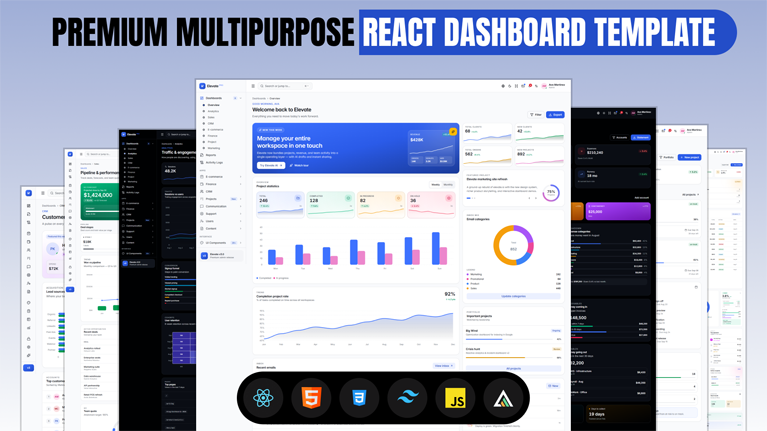
Elevate is a modern, production-ready React admin dashboard template built for teams that ship serious products. It combines eight pre-designed dashboards, an eighty-component design system, a live customizer, and first-class RTL support in a fast, fully typed codebase powered by React 19, Vite, TypeScript, and Tailwind CSS v4.
Whether you are building a SaaS analytics tool, an internal admin panel, a CRM, or a full ecommerce back office, Elevate gives you every screen and pattern you need on day one — with zero legacy baggage and a clean, scalable architecture.
What is Elevate?
Elevate is a premium admin template that turns weeks of setup into minutes. Every dashboard is designed around a real business problem, and every component is accessible, keyboard-navigable, and theme-aware by default.
- Eight production-grade dashboards for analytics, sales, CRM, ecommerce, finance, project management, marketing, and workspace overview.
- Eighty-plus reusable React components covering navigation, data display, forms, feedback, and overlays.
- Light and dark themes with pixel-perfect parity and accessible contrast in both modes.
- Full right-to-left (RTL) support for Arabic, Hebrew, and Farsi audiences.
- Live customizer to change theme, accent color, sidebar style, header, layout width, and density in real time.
- Fully responsive layouts designed for desktop, laptop, tablet, and mobile — not just resized.
Core Features
Multiple Premium Dashboards
Every dashboard is composed with a clear information hierarchy and realistic sample data, ready to swap for your own API.
- Workspace overview with projects, revenue, and team activity.
- Product analytics with funnels, cohorts, and event streams.
- Sales performance with quota attainment and forecast versus actual.
- CRM with pipelines, activities, and deal forecasts.
- Ecommerce storefront with orders, best sellers, and stock health.
- Finance with cash balance, inflow versus outflow, and runway.
- Project management with sprint progress, blockers, and velocity.
- Marketing with attribution, spend, and creative-level engagement.
Light and Dark Themes
Both themes share the same design tokens, spacing, and hierarchy. Switching modes never breaks a layout or muddies a color.
- Semantic color tokens using OKLCH for smooth interpolation.
- Automatic system-preference detection with per-user override.
- Accessible contrast ratios on every text and interactive element.
- Charts, illustrations, and shadows all theme-aware.
Right-to-Left (RTL) Support
RTL is not an afterthought. Every layout, icon, and chart mirrors cleanly at the flip of a toggle.
- Logical CSS properties throughout (start/end instead of left/right).
- Mirrored icons for direction-aware controls.
- RTL-safe chart axes and legends.
- One-line switch in the customizer or via user preference.
Live Theme Customizer
A right-side panel exposes every visual choice in real time — no config files, no rebuilds.
- Light, dark, or system theme mode.
- LTR or RTL text direction.
- Seven accent color presets plus code-level token overrides.
- Sidebar variants: expanded, compact, icons-only, overlay, or push.
- Header styles: sticky, bordered, or floating pill with blur-on-scroll.
- Content density: comfortable or compact.
- Full width or boxed container layout.
- All settings persist per user via local storage.
Advanced Tables
Data tables ship with everything you would build yourself if you had a spare month.
- Sorting, filtering, and multi-column search.
- Pagination and virtualization for large datasets.
- Row selection, bulk actions, and inline editing.
- Sticky headers and horizontally-scrollable columns.
- Responsive column priority and mobile-friendly card fallbacks.
Forms and Inputs
Accessible, keyboard-friendly form primitives ready for real production use.
- Text, email, password, number, textarea, select, radio, checkbox, switch.
- Masked inputs, date and time pickers, and file upload dropzones.
- Inline validation and error states.
- Multi-step wizards with progress and stateful review.
Charts and Analytics
Rich data visualization powered by ApexCharts, tuned for both themes and RTL.
- Line, area, bar, column, stacked, and grouped charts.
- Pie, donut, radial, and radar variants.
- Sparklines and mini KPI charts.
- Interactive tooltips, zoom, and legend toggles.
Authentication Pages
Seven ready-to-use authentication flows, each with a distinct premium composition.
- Sign in with social providers.
- Register with password strength meter.
- Forgot password and reset password with token flow.
- Six-digit OTP verification.
- Two-factor authentication with app, SMS, biometric, and recovery code options.
- Lock screen with faux dashboard background.
UI Components Library
Eighty-plus components covering every common admin need.
- Buttons, badges, avatars, and pills.
- Cards, KPI tiles, and stat blocks.
- Alerts, toasts, and empty states.
- Modals, drawers, and command palette.
- Tabs, accordions, and dropdown menus.
- Progress bars, radial progress, and skeletons.
- Timeline, stepper, and tooltip.
Calendar
A full-featured calendar app with multiple views and event categories.
- Month, week, day, and agenda views.
- Event categories with color coding.
- Right-side day details and quick add.
- Integrations panel for Google, Outlook, iCloud, and Notion.
File Manager
Browse, upload, and organize files with a clean, keyboard-navigable interface.
- Grid and list views.
- Folder tree with breadcrumbs.
- Multi-select actions and preview.
- Drag-and-drop upload.
User Management
Ready-made screens for managing your team, invitations, and access.
- Users list with search and role filters.
- Add and edit user profiles.
- Activity and audit log per user.
- Team invitations with pending-status tracking.
Roles and Permissions
Granular access control that scales with your organization.
- Role editor with capability toggles.
- Permission matrix by resource and action.
- Custom role creation and cloning.
- Assignable to individual users or groups.
Global Search
Command-K style global search that finds any page, record, or action instantly.
- Keyboard-first with fuzzy matching.
- Categorized results with icons.
- Recent items and quick actions.
- Extensible with your own data sources.
Horizontal and Sidebar Menus
Two navigation modes plus multiple variants, switchable live from the customizer.
- Vertical sidebar with collapse and hover-expand.
- Compact icons-only sidebar for information-dense layouts.
- Horizontal top navigation with dropdown submenus.
- Sticky, bordered, or floating header styles.
Customizable Layout
Every layout choice is a first-class citizen, not a hidden flag.
- Full-width or boxed content container.
- Sticky, blurred, or bordered header.
- Comfortable or compact spacing density.
- Configurable sidebar width and header height.
Modern Design System
Elevate is built like a product, not a template. Every screen shares the same tokens, rhythm, and voice.
- 4px baseline grid enforced through spacing tokens.
- Inter for UI, Manrope for display typography.
- Semantic color, elevation, and radius tokens.
- Reusable component API with sensible defaults.
- Consistent focus rings and interactive states.
Who Elevate Is For
Elevate is designed for product teams, agencies, and independent developers who need a polished admin foundation without months of design and engineering work.
- SaaS founders launching an admin console for their product.
- Agencies delivering white-labeled dashboards to clients.
- Enterprise teams building internal tools and back offices.
- Freelancers assembling MVPs and prototypes rapidly.
- Product designers evaluating dashboard patterns and interactions.
Technology Stack
Elevate uses a modern, forward-looking stack with no legacy baggage.
- React 19 with concurrent features and Server Components ready.
- TypeScript in strict mode across every component.
- Vite 8 for sub-second dev reload and fast production builds.
- Tailwind CSS v4 with OKLCH tokens and cascade layers.
- React Router 7 for client-side routing.
- ApexCharts and react-apexcharts for data visualization.
- Lucide React for icons.
Why Choose Elevate
- Production-ready code with strict TypeScript from the first commit.
- Design that feels premium, not templated.
- Every screen responsive by design, not by afterthought.
- Light, dark, and RTL as first-class concerns.
- Live customizer removes the need for config files and rebuilds.
- Sub-second dev reload and roughly 120 KB gzipped runtime.
- Comprehensive documentation and clean, maintainable structure.







 Live Preview