Dashing – Premium HTML Admin Dashboard Template

HTML5 CSS3 JavaScript jQuery
Need Help ?
Dashing – Premium HTML Admin Dashboard Template - Premium Template

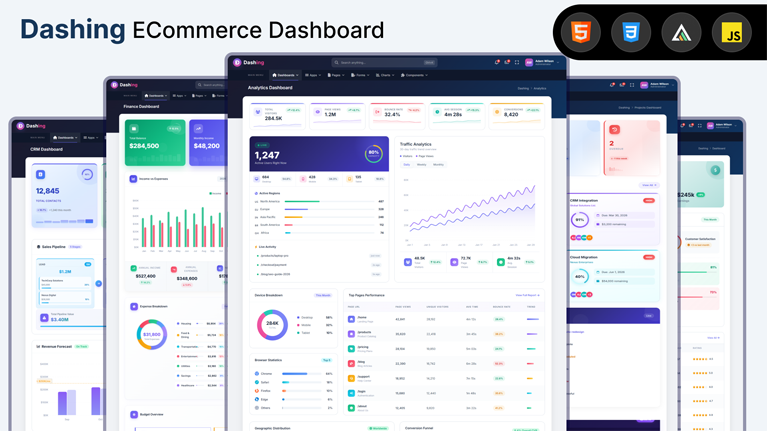
Dashing is a premium HTML admin dashboard template with 5 unique dashboards, 65+ pages, 13 chart variants, built-in apps, 50+ UI components, 9 form layouts, and pixel-perfect responsive design.

Clear Documentation

Premium Support

Regular Updates

Need Help? We're Here For You

Our dedicated support team is available 24/7 to help you with any questions or issues. Get in touch with us anytime.

24/7

Availability

Fast Response

Time

Expert

Assistance

Flexible pricing plans tailored for your business

Discover our range of professionally designed templates.

100% Moneyback Guarantee
Secure Checkout · Instant Download · Risk Free

Single Use

For a single end product, with no user fees.

$24
Purchase Now
  • Full source code
  • Documentation
  • Use in SaaS app
  • Projects 1

Multiple Use

For a single end product, with no user fees.

$49
Purchase Now
  • Full source code
  • Documentation
  • Use in SaaS app
  • Projects 3

Extended Use

For a single end product, with no user fees.

$199
Purchase Now
  • Full source code
  • Documentation
  • Use in SaaS app
  • Projects Unlimited

For Business

For multiple end products with user charges.

$999
Purchase Now
  • Full source code
  • Documentation
  • Use in SaaS app
  • Projects Unlimited

Description

Dashing is a hand-crafted premium HTML admin dashboard template built for modern web applications, SaaS products, internal tools, and data-heavy back-office systems. Engineered with pure HTML5, CSS3, and vanilla JavaScript, it ships without framework lock-in or build-step overhead — drop it into any backend (PHP, Laravel, Rails, Django, Node.js, .NET) and start shipping in minutes.

Five Unique Dashboards Tailored to Real Business Needs

Every Dashing license includes five fully designed dashboard variants, so your product never feels like a generic template:

  • eCommerce Dashboard — revenue trendline, store performance gauges, top-selling product leaderboard, recent orders table, customer locations world map, and demographics breakdown.
  • Analytics Dashboard — live visitor counter, 30-day traffic chart, device breakdown donut, top pages performance table, browser statistics, geographic distribution, and a visual conversion funnel.
  • CRM Dashboard — five-stage sales pipeline kanban, monthly revenue trend, top performer leaderboard, activity timeline, customer satisfaction breakdown, and upcoming task reminders.
  • Finance Dashboard — cashflow bar chart, expense breakdown donut, real-time transactions feed, budget tracker, investment portfolio overview, and upcoming bills.
  • Projects Dashboard — project status cards, circular progress rings, Gantt-style project timeline, sprint board with velocity tracking, team workload monitor, and departmental budget overview.

65+ Production-Ready Pages

Beyond the dashboards, Dashing includes more than 65 ready-to-ship pages covering every common product surface — eight built-in apps (Email, Chat, Calendar, Kanban, File Manager, Contacts, Tasks, Gallery), commerce workflows (Products, Orders, Customers, Invoices), team productivity (Projects, Settings, Profile, Pricing, FAQ), authentication (Login, Register), and error pages (404).

13 Stunning Chart Variants Powered by ApexCharts

Data visualization is at the heart of any admin product. Dashing ships with 13 hand-styled chart variants including area charts, line charts, column charts, doughnut charts, gradient charts, radial bar charts, candlestick charts for finance applications, and six minimal “shadcn-style” chart variants (area, bar, line, doughnut, radar, radial bar) — all consistent in tone with the rest of the design system.

50+ Pixel-Perfect UI Components

Every UI primitive you’ll need is included and pre-styled: buttons, cards, alerts, badges, avatars, breadcrumbs, accordions, carousels, collapsible sections, combobox with typeahead, datepickers, modal dialogs, slide-in drawers, dropdown menus, progress bars, skeleton loaders, tabs, timelines, and tooltips. All components are keyboard-accessible, fully responsive, and built on semantic HTML.

9 Form Layouts and Patterns

Forms are first-class in Dashing — the template includes vertical, horizontal, custom, validation, repeater (dynamic add/remove rows), and a multi-step wizard layout. Built-in password strength meter, tag input, color swatch picker, file dropzone, and live range slider value display work out of the box.

Built for Speed and Maintainability

Dashing is built on pure HTML5 and CSS3 with vanilla JavaScript. No React, no Vue, no Angular, no Tailwind compile pipeline, no Webpack configuration. Pages load in under 200 milliseconds even on slow connections. CSS is organized into clean modular files with custom properties for theming. JavaScript is broken into discrete init functions for easy extension and debugging.

Fully Responsive Across Every Breakpoint

From a 320-pixel mobile phone to a 4K monitor, every Dashing page renders crisply. Carefully designed mobile navigation, collapsible sidebars, adaptive grids, and touch-friendly tap targets make the template a complete responsive solution.

Premium Design System

Spacing, typography, color, shadow, and animation have been hand-tuned by a senior product designer for a distinctly premium feel. The default palette uses a vibrant indigo-to-pink gradient as the brand accent, with semantic colors for success, danger, warning, and info states. All visual decisions are encoded as CSS custom properties so brand customization takes minutes, not days.

Modern Browser Support and Accessibility

Dashing targets all evergreen browsers — Chrome, Edge, Firefox, Safari, and Opera. Components ship with proper ARIA attributes, semantic landmarks, keyboard navigation, and focus states. The template uses modern CSS features such as the :has() selector, custom properties, grid, and backdrop filters for a contemporary feel without sacrificing performance.

Who Dashing Is For

Dashing is ideal for SaaS founders shipping admin panels, agencies building client back-offices, freelancers delivering internal tools, in-house teams replacing aging back-office UIs, and developers who want a beautiful starting point without the friction of integrating a heavyweight UI framework.


Why Developers Choose Us

Our templates include everything you need to create modern, scalable websites with ease.

Responsive Design

Every template is fully responsive and looks stunning on all devices - from mobile to desktop.

Lightning Fast

Optimized for performance with minimal CSS and no dependencies. Your site will load in milliseconds.

Easy Customization

Easily customize layouts, colors, typography, and components to match your brand identity.

Clean Code

Well-organized, commented code that's easy to understand and modify for your needs.

Regular Updates

Get free lifetime updates with new features, improvements, and security patches.

Premium Support

Get help when you need it with our dedicated support team available 24/7.

Frequently Asked Questions

Find answers to the most common questions about orders, shipping, returns, and more.

Still have a question?

We're here to help! Reach out to our support team and we'll get back to you as soon as possible.

What is an admin dashboard template and how is it used in web applications?
An admin dashboard template is the control room of a web application. Every serious product has one. It is where administrators manage users, teams monitor activity, and product managers watch performance numbers move in real time. Instead of designing and building this interface from scratch, developers start with a template that already contains the structural UI layer required for operations. Inside it live dashboards, reporting panels, tables that hold thousands of records, configuration pages, and system controls. Engineers connect their backend services to this interface and immediately gain a working operational console. That shortcut removes a large portion of repetitive interface development that most web applications eventually require.
Which frameworks do modern admin dashboard templates usually support?
Admin dashboards rarely exist in isolation. They must fit directly into the development stack already running the product. For that reason most modern dashboard templates support several popular front-end frameworks. React appears most often because its component system fits data-heavy interfaces extremely well. Next.js commonly follows when teams want server rendering and efficient routing. Angular remains common inside enterprise environments where applications grow large and structured. Vue attracts teams who prefer lightweight reactive frameworks. Bootstrap dashboards remain useful for rapid interface deployment, while Tailwind dashboards provide extremely flexible styling systems. Supporting these frameworks allows teams to integrate dashboards into existing projects without reworking their entire codebase.
What features should a high-quality admin dashboard template include?
A capable admin dashboard template operates like the operating system of the application’s internal environment. It brings together multiple UI elements that administrators rely on constantly. Analytics dashboards visualize performance data through charts and graphs. Large data tables allow teams to browse and manage records such as users, transactions, or inventory items. Forms enable structured workflows like product creation or account management. Authentication pages handle system access. Notification panels show system events. Reporting modules summarize trends. Navigation systems tie everything together so users can move quickly between operational areas. When those components already exist, development teams skip weeks of repetitive interface work.
How much development time can an admin dashboard template save?
Admin dashboard templates compress the entire development phase dramatically. The UI infrastructure already exists. Developers move straight into connecting APIs, integrating databases, and wiring business logic into the interface. A dashboard template removes weeks of front-end engineering work and allows product features to reach production much faster.
Are admin dashboard templates suitable for large SaaS platforms?
Yes, and many SaaS products actually begin that way. The administrative needs of SaaS platforms tend to follow familiar patterns. Teams need user management panels, analytics views, subscription data, reporting tools, configuration pages, and system monitoring dashboards. A strong dashboard template already contains the UI structure required for these operations. Developers then extend it by adding application-specific data layers and new modules as the product evolves. Startups benefit because they launch quickly with a polished operational interface. In short, admin dashboard templates are very well suited for large SaaS platforms.
Can developers customize admin dashboard templates easily?
Yes of course! In fact, customization is a major reason teams choose dashboard templates in the first place. No two applications display identical data or follow identical workflows. Therefore, developers usually use dashboards extensively once the template enters a project. This makes sure that entire modules such as billing systems, order management panels, or customer support tools often get introduced. Templates are useful because they can change the branding easily. Because dashboard templates rely on reusable UI components, developers extend the interface gradually without rewriting the foundation.
Which types of applications commonly use admin dashboard templates?
Admin dashboards appear almost everywhere modern software operates. SaaS platforms depend on them to manage users and monitor product performance. Ecommerce companies operate inventory systems, orders, and sales metrics through dashboards. CRM tools use dashboard panels to organize the customer records and communication history. Even analytics platforms use them to visulaize reporting data.  Some enterprise tools depend on dashboards to track operations and system activity. Some marketplaces and fintech applications also depend heavily on administrative interfaces.

Explore Top Selling Admin Templates

Discover our most popular modern, responsive, and developer-friendly admin dashboard templates.

News & Articles

Discover our most popular modern, responsive, and developer-friendly admin dashboard templates.

Subscribe to our newsletter

From strategy to execution, we help you create powerful digital experiences that drive real results.

Stay Updated No spam, unsubscribe anytime.