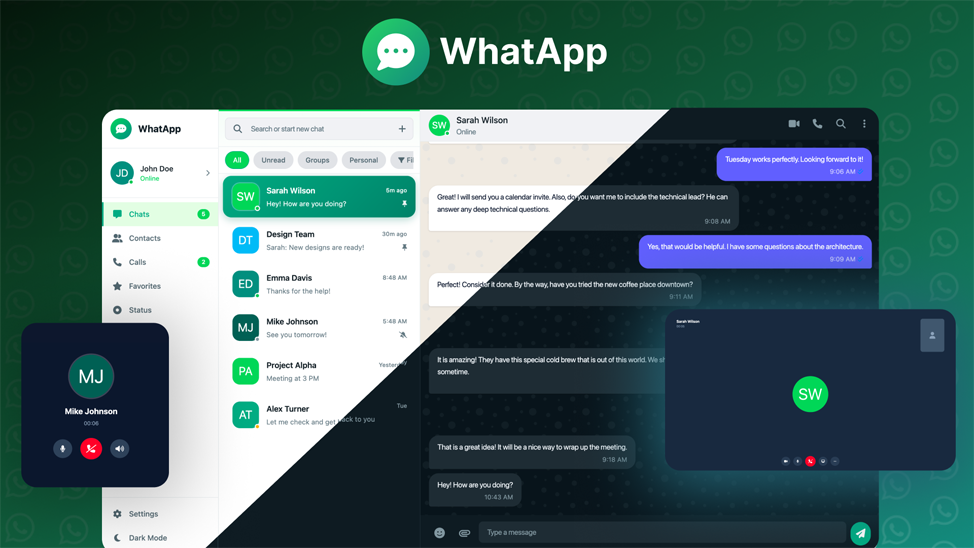
WhatApp is a professionally designed, modern messaging web application HTML template that replicates the sleek and intuitive user interface of popular messaging platforms. Built with the latest Tailwind CSS framework, this template provides a solid foundation for developers and businesses looking to create stunning chat applications, customer support systems, or social communication platforms.
With its clean code architecture, responsive design, and extensive feature set, WhatApp delivers a production-ready solution that saves countless hours of development time while maintaining the highest standards of UI/UX design.
Key Features
Complete Chat Interface
Full-featured messaging area with message bubbles, timestamps, read receipts, typing indicators, and smooth scrolling.
Dark & Light Themes
Built-in theme switcher with Light, Dark, and System preference modes for optimal user experience.
Multi-Panel Navigation
Organized sidebar navigation with Chats, Contacts, Calls, Favorites, Status, Archived, and Settings panels.
Comprehensive Settings
Complete settings system including Account, Notifications, Appearance, Chats, Storage & Data, and Help sections.
User Interface Components
- Navigation Sidebar: Wide sidebar with profile section, navigation items with badges, and quick actions
- Chat List Panel: Searchable chat list with filter tabs (All, Unread, Groups, Personal)
- Contacts Panel: Contact management with search and add contact functionality
- Calls Panel: Call history with filter options (All, Missed, Incoming, Outgoing)
- Status Panel: Status updates section similar to WhatsApp Stories
- Favorites Panel: Quick access to favorite contacts
- Archived Panel: Archived conversations management
Chat Features
- Real-time typing indicators with animated dots
- Message status indicators (sent, delivered, read)
- Voice and video call buttons
- In-chat search functionality
- Emoji picker integration ready
- File attachment menu (Documents, Photos, Camera, Contact, Location, Poll)
- Voice message recording button
- Attachment preview with file info
- Custom chat wallpapers
Customization Options
- Theme Selection: Light, Dark, and System-based themes
- Accent Colors: 8 color options (Green, Purple, Pink, Red, Orange, Green, Teal, Blue)
- Chat Wallpapers: Multiple wallpaper options for chat background
- Font Size Control: Adjustable font size slider
- Privacy Controls: Last seen, Profile photo, About, Read receipts toggles
- Notification Settings: Granular control over message, group, and call notifications
Settings Sections
- Account: Profile info, privacy settings, security options, two-step verification
- Notifications: Message, group, and call notification controls
- Appearance: Theme, accent color, wallpaper, and font size settings
- Chats: Display options, archived chats, backup, and chat history
- Storage & Data: Storage usage visualization, auto-download settings, network statistics
- Help: Support contact, FAQ accordion, legal links
- Invite Friends: Share via social media, invite link, QR code
Technical Specifications
- Framework: Tailwind CSS v3.x
- Icons: Font Awesome 6.4
- Fonts: Inter (Google Fonts)
- Code: Clean, semantic HTML5
- CSS: Modern CSS with Flexbox & Grid layouts
- Responsive: Mobile-first approach
- Browser Support: All modern browsers (Chrome, Firefox, Safari, Edge)
- Well Documented: Clean, commented code for easy customization
What’s Included
- Complete HTML template with all UI components
- Tailwind CSS configuration
- Custom CSS styles
- SVG Favicon
- Ready for JavaScript integration
Perfect Use Cases
- Instant Messaging Applications
- Customer Support Chat Systems
- Team Collaboration Tools
- Social Networking Platforms
- Dating & Matchmaking Apps
- E-commerce Live Chat
- Healthcare Communication Portals
- Educational Platform Messaging
- Community Forums with Chat
- SaaS Dashboard Communication Modules
Why Choose WhatApp Template?
- Production Ready: Well-structured code ready for integration
- Time Saving: Skip months of UI development work
- Modern Design: Following latest UI/UX trends
- Customizable: Easy to modify and extend
- Clean Code: Follows best practices and coding standards
- Regular Updates: Continuous improvements and new features
Support
We provide dedicated support for all our customers. If you have any questions or need assistance with customization, feel free to reach out through our support channel.
Product Information
-
304+Sales
-
TechnologiesHTML CSS JavaScript jQuery Tailwind CSS