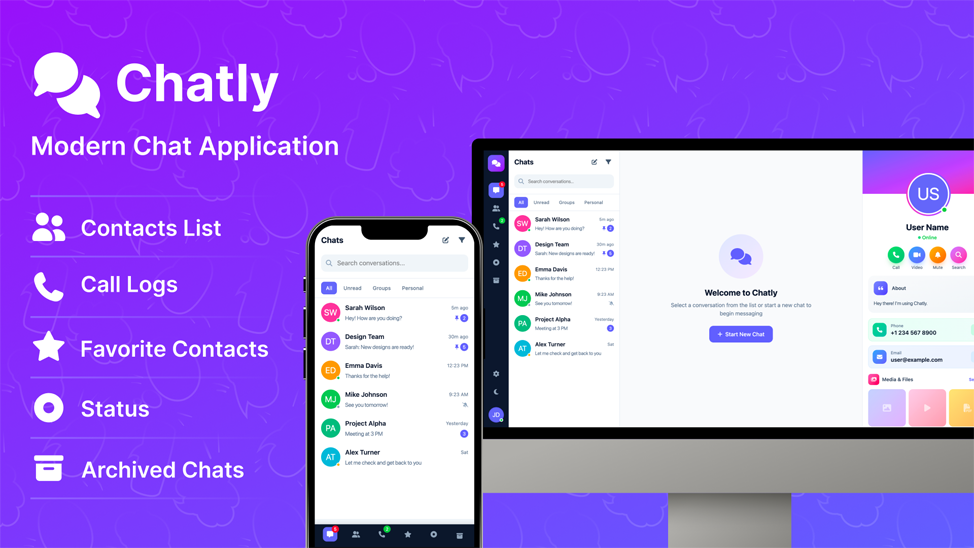
Chatly is a comprehensive chat and messaging UI template designed for developers, startups, and businesses looking to build modern communication platforms. Whether you’re creating a customer support chat, team collaboration tool, social messaging app, or any real-time communication solution, Chatly provides the perfect foundation with its polished interface and extensive feature set.
The template follows modern UI/UX principles with smooth animations, intuitive navigation, and a clean aesthetic that users will love. It’s built to be easily customizable and integrates seamlessly with any backend technology of your choice.
Key Features
Complete Chat System
Full-featured messaging interface with chat lists, message bubbles, typing indicators, read receipts, and real-time conversation views. Supports text, images, videos, audio, and file attachments.
Status/Stories Feature
WhatsApp-like status system with support for text, image, and video statuses. Includes story viewer with progress bars, navigation, reply functionality, and reactions.
Voice & Video Calls UI
Beautiful call interfaces for both voice and video calls with mute, speaker controls, call duration tracking, and connection status indicators.
Complete Dark Mode
Comprehensive dark theme implementation with 150+ custom dark mode styles. Supports light, dark, and system preference modes with smooth transitions.
Advanced Settings Panel
Fully designed settings section including account management, privacy controls, notification preferences, appearance customization, storage management, and help center.
Contact Management
Organized contact list with search functionality, online status indicators, quick actions, and detailed profile views with shared media galleries.
All Features at a Glance
Chat Features
- Real-time chat list with unread message badges
- Filter tabs: All, Unread, Groups, Personal
- Message search functionality
- Sent/received message bubbles with timestamps
- Typing indicator animation
- Message reactions support
- Media messages (images, videos, audio, documents)
- Voice message waveform display
- File attachment preview before sending
- Emoji picker with multiple categories
- Auto-expanding message input
- Archived chats section
- Starred/favorite conversations
Contact & Profile Features
- Contact list with alphabetical organization
- Online/offline status indicators
- Detailed user profile sidebar
- Animated gradient avatar display
- Shared media gallery
- Common groups display
- Block, star, and delete contact options
- About/bio section
- Contact information (phone, email)
Call Features
- Call history with filter tabs (All, Missed, Incoming, Outgoing)
- Voice call modal with controls
- Video call interface with local/remote views
- Call duration tracking
- Missed call notifications
- Quick call actions from contacts
Status/Stories Features
- Create text, image, and video statuses
- Story viewer with progress bar
- Navigation between multiple statuses
- Reply to status functionality
- Like/reaction support
- View count tracking
- Media type indicators
Settings & Customization
- Account settings with profile management
- Privacy settings (last seen, profile photo, about, read receipts)
- Security settings (two-factor authentication, password change)
- Notification preferences (messages, groups, calls)
- Theme selection (Light/Dark/System)
- 8 accent color options
- Chat wallpaper selection
- Auto-download media preferences
- Storage usage visualization
- Chat backup and export options
- Help center with FAQ accordion
- Invite friends via multiple channels
UI/UX Features
- Smooth slide transitions and animations
- Custom scrollbar styling
- Tooltip hints on navigation
- Context menus for quick actions
- Toast notifications
- Modal dialogs with overlay
- Loading states and empty states
- Pulse animations for online status
- Ripple effects on interactions
Fully Responsive Design
Chatly is built with a mobile-first approach and looks perfect on all devices:
- Desktop (1024px+): Three-column layout with navigation, chat list, main chat area, and profile sidebar
- Tablet (768px-1024px): Optimized two-column layout with collapsible sidebar
- Mobile (max 768px): Full-screen panels with bottom navigation bar
- Small Mobile (max 480px): Compact navigation with adjusted spacing
- Landscape Mode: Optimized layout for horizontal orientation
- Safe Area Support: Proper handling for notched devices (iPhone X and newer)
Technologies Used
Tailwind CSS v4.1 Vanilla JavaScript Font Awesome 6.4 Google Fonts (Inter) CSS3 Animations HTML5 PostCSS Autoprefixer
What’s Included
- Well-organized and commented HTML file
- Minified and development CSS files
- Comprehensive JavaScript with all interactions
- Sample data for demonstration
- Custom favicon (SVG)
- Build configuration files
- Documentation
Why Chatly Stands Out
- No Framework Dependency: Built with vanilla JavaScript for maximum flexibility and performance
- Single HTML File: Easy deployment and integration
- Production Ready: Minified CSS, optimized assets, and clean code
- Highly Customizable: Tailwind CSS configuration and CSS variables for easy theming
- Cross-Browser Compatible: Works flawlessly on Chrome, Firefox, Safari, and Edge
- Well Documented: Clean, readable code with helpful comments
- Regular Updates: Continuous improvements and new features
- Dedicated Support: Fast and helpful customer support
Perfect For
- Chat & Messaging Applications
- Customer Support Platforms
- Team Collaboration Tools
- Social Networking Apps
- Dating App Chat Interfaces
- E-commerce Customer Chat
- Healthcare Communication Portals
- Educational Platform Messaging
- SaaS Product Chat Features
- Real-time Communication Solutions
Browser Support
- Google Chrome (Latest)
- Mozilla Firefox (Latest)
- Apple Safari (Latest)
- Microsoft Edge (Latest)
- Opera (Latest)
Credits
- Tailwind CSS – tailwindcss.com
- Font Awesome – fontawesome.com
- Google Fonts (Inter) – fonts.google.com
- UI Avatars – ui-avatars.com
Product Information
-
489+Sales
-
TechnologiesHTML CSS JavaScript jQuery Tailwind CSS